

When I had to turn a column of comma-separated tags into one row per tag, I used STRING_SPLIT, and it took one line. This post shows that script first. Then it covers the syntax, the enable_ordinal argument, and the four traps that trip people up: the compatibility level, a one-character separator, rows with no guaranteed order, and empty items. Every script ran on SQL Server 2022 (CU28).
Split a string into rows
STRING_SPLIT cuts a string at a separator character and returns one row per piece. It is a table-valued function, so it goes in the FROM clause. It works on SQL Server 2016 and later, Azure SQL Database and Azure SQL Managed Instance.
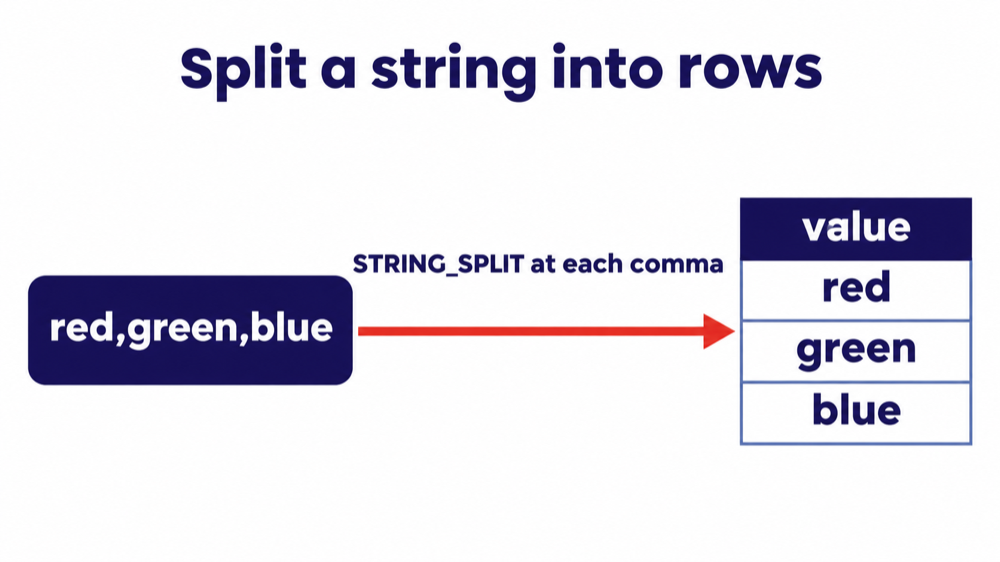
SELECT value
FROM STRING_SPLIT('red,green,blue', ',');| value |
|---|
| red |
| green |
| blue |
The result column is always called value. STRING_SPLIT keeps spaces, so 'red, green, blue' returns green and blue with a leading space. Trim each piece yourself:
SELECT value, LTRIM(RTRIM(value)) AS trimmed_value
FROM STRING_SPLIT('red, green, blue', ',');
STRING_SPLIT syntax
STRING_SPLIT ( string , separator [ , enable_ordinal ] )| Argument | What it is |
|---|---|
string | Any character expression (char, varchar, nchar, nvarchar) |
separator | One character, in any character type |
enable_ordinal | Optional. 1 adds an ordinal column. SQL Server 2022 and Azure SQL only |
The value column is nvarchar when either argument is nvarchar or nchar, and varchar otherwise. The Microsoft Learn page for STRING_SPLIT lists every argument and the versions each one applies to.
Split a table column with CROSS APPLY
CROSS APPLY runs STRING_SPLIT once for each row of a table. The sample table below holds a tag list in one column:
CREATE TABLE dbo.Article
(
    ArticleId int           NOT NULL PRIMARY KEY,
    Title     nvarchar(100) NOT NULL,
    Tags      nvarchar(200) NULL
);

INSERT dbo.Article (ArticleId, Title, Tags) VALUES
 (1, N'Index maintenance plan', N'indexes,maintenance,performance'),
 (2, N'Restore drill',          N'backup'),
 (3, N'Deadlock triage',        N'locking,performance'),
 (4, N'Team notes',             NULL);

SELECT a.ArticleId, a.Title, s.value AS tag
FROM dbo.Article AS a
CROSS APPLY STRING_SPLIT(a.Tags, ',') AS s
ORDER BY a.ArticleId;| ArticleId | Title | tag |
|---|---|---|
| 1 | Index maintenance plan | indexes |
| 1 | Index maintenance plan | maintenance |
| 1 | Index maintenance plan | performance |
| 2 | Restore drill | backup |
| 3 | Deadlock triage | locking |
| 3 | Deadlock triage | performance |
Article 4 has NULL tags, so CROSS APPLY drops it. Switch to OUTER APPLY to keep that article with a NULL tag. The tags inside one article can come back in a different order. The ordinal section below shows how to pin it.
You can also use STRING_SPLIT inside a filter. This query returns the articles whose ids are in a list:
DECLARE @ids varchar(100) = '1,3';

SELECT ArticleId, Title
FROM dbo.Article
WHERE ArticleId IN (SELECT value FROM STRING_SPLIT(@ids, ','));
Get each item's position with enable_ordinal
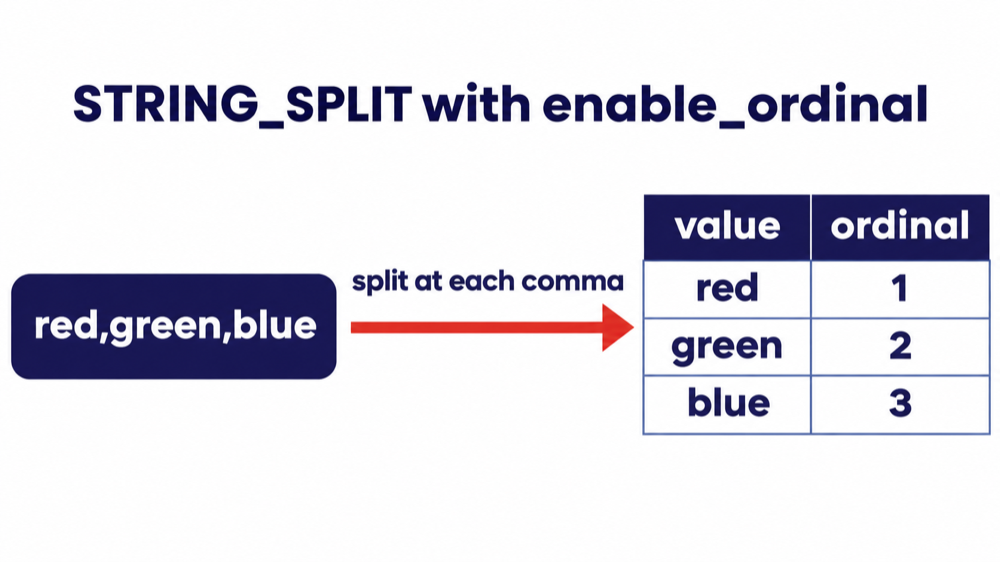
On SQL Server 2022 and Azure SQL, pass 1 as the third argument to get an ordinal column. It holds the 1-based position of each piece in the original string.
SELECT value, ordinal
FROM STRING_SPLIT('red,green,blue', ',', 1)
ORDER BY ordinal;| value | ordinal |
|---|---|
| red | 1 |
| green | 2 |
| blue | 3 |
The argument must be a constant. A variable or a column fails with error 8748. The ordinal column is bigint.
Position helps when the pieces mean different things. This query splits a version number into columns:
DECLARE @version varchar(20) = '16.0.4315.2';

SELECT
    MAX(CASE WHEN ordinal = 1 THEN value END) AS Major,
    MAX(CASE WHEN ordinal = 2 THEN value END) AS Minor,
    MAX(CASE WHEN ordinal = 3 THEN value END) AS Build,
    MAX(CASE WHEN ordinal = 4 THEN value END) AS Revision
FROM STRING_SPLIT(@version, '.', 1);| Major | Minor | Build | Revision |
|---|---|---|---|
| 16 | 0 | 4315 | 2 |
It also lets you pair two lists by position. Here a name list and a score list line up item by item:
CREATE TABLE dbo.Pairs (Id int PRIMARY KEY, Names varchar(50), Scores varchar(50));
INSERT dbo.Pairs VALUES (1, 'ann,bob,cy', '90,75,82');

SELECT p.Id, n.value AS Name, s.value AS Score
FROM dbo.Pairs AS p
CROSS APPLY STRING_SPLIT(p.Names, ',', 1)  AS n
CROSS APPLY STRING_SPLIT(p.Scores, ',', 1) AS s
WHERE n.ordinal = s.ordinal
ORDER BY n.ordinal;| Id | Name | Score |
|---|---|---|
| 1 | ann | 90 |
| 1 | bob | 75 |
| 1 | cy | 82 |
Fix "Invalid object name STRING_SPLIT"
The error means the DB is below compatibility level 130, the level that matches SQL Server 2016. (Microsoft's compatibility level table lists it.) The function exists on your server, but a DB set to an older level cannot see it. On a DB at level 120, SELECT value FROM STRING_SPLIT('a,b,c', ','); returned this:
Msg 208, Level 16, State 1, Line 1
Invalid object name 'STRING_SPLIT'.
Check the level, then raise it:
SELECT name, compatibility_level
FROM sys.databases
WHERE name = DB_NAME();

ALTER DATABASE YourDatabase SET COMPATIBILITY_LEVEL = 130;
After the change, the same query returned a, b and c. A higher level can change query plans, so test it on a copy first. The database compatibility level controls which engine behaviors a DB uses.
The STRING_SPLIT page on Microsoft Learn also lists a database-scoped option, ALLOW_BUILTIN_TVF_IN_ALL_COMPAT_LEVELS, that removes the level requirement. It is in preview and applies to Azure SQL Database and SQL database in Microsoft Fabric. On SQL Server 2022 CU28 it returned a syntax error, so on SQL Server you change the level.
Not sure which of your DBs still sit on an old compatibility level? Our Health Check runs 145 read-only checks across security, performance and cost, and shows you where to look first.
Handle empty strings and NULL
Two separators in a row produce an empty row, and an empty string produces one empty row. A NULL string produces no rows at all.
SELECT value
FROM STRING_SPLIT('indexes,backup,,restore,logs', ',')
WHERE value <> '';
Without the WHERE clause, this query returns five rows, and the third one is empty. These counts came from a test:
| Input | Rows returned |
|---|---|
'a,b,' (trailing comma) | 3, the last one empty |
'' (empty string) | 1, empty |
NULL | 0 |
To drop empty and space-only pieces together, filter on LTRIM(RTRIM(value)) <> ''.
Use a separator longer than one character
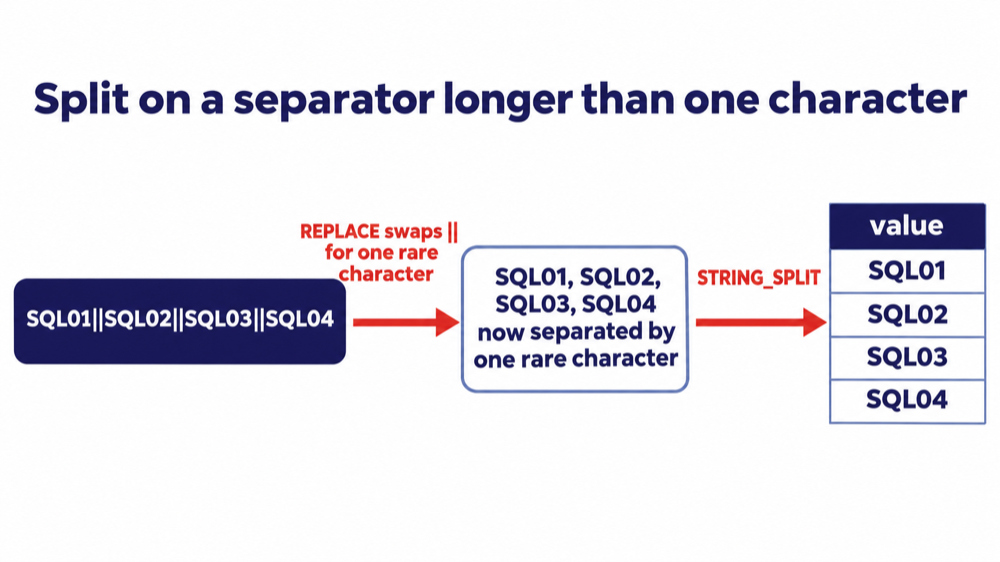
STRING_SPLIT accepts one character as the separator. A separator such as || or -- fails with error 214: Procedure expects parameter 'separator' of type 'nchar(1)/nvarchar(1)'.
The fix is to swap the long separator for one rare character before you split. Pick a character that never appears in your data.
DECLARE @servers  nvarchar(max) = N'SQL01||SQL02||SQL03||SQL04',
        @longSep  nvarchar(10)  = N'||',
        @shortSep nchar(1)      = NCHAR(9999);   -- a character the data never uses

SELECT value
FROM STRING_SPLIT(REPLACE(@servers, @longSep, @shortSep), @shortSep);
It returns SQL01, SQL02, SQL03 and SQL04.
Do not rely on the row order
STRING_SPLIT does not promise to return rows in the order of the string. Microsoft's documentation says the rows might come back in any order. The rows often look ordered, so do not trust what you see on a small test.
On SQL Server 2022 and Azure SQL, sort by ordinal:
SELECT value
FROM STRING_SPLIT('red,green,blue', ',', 1)
ORDER BY ordinal;
Before SQL Server 2022 the function cannot tell you the position. If order matters there, use the splitter in the next section.
Split a string on older versions
Below compatibility level 130, and on SQL Server 2014 and earlier, use an XML splitter or a recursive CTE. SQL Server 2014 and earlier never had STRING_SPLIT.
This XML version works on a DB at level 110. I tested it there.
DECLARE @servers varchar(255) = 'SQL01,SQL02,SQL03,SQL04,SQL05';

SELECT n.item.value('.', 'varchar(50)') AS value
FROM (SELECT CAST('<list><s>' + REPLACE(@servers, ',', '</s><s>') + '</s></list>' AS xml) AS doc) AS src
CROSS APPLY src.doc.nodes('/list/s') AS n(item);
It has one limit: a character that XML treats specially breaks it. A list such as R&D,Sales,IT failed with error 9411, an XML parsing error.
The second option is a recursive CTE that also returns the position, so it fixes the order problem. I wrote this one and tested it at level 110:
CREATE FUNCTION dbo.SplitOrdered (@list nvarchar(max), @delim nchar(1))
RETURNS TABLE
AS
RETURN
(
    WITH parts AS
    (
        SELECT 1 AS ordinal,
               CAST(1 AS bigint) AS start_pos,
               CHARINDEX(@delim, @list) AS end_pos
        WHERE @list IS NOT NULL
        UNION ALL
        SELECT ordinal + 1,
               end_pos + 1,
               CHARINDEX(@delim, @list, end_pos + 1)
        FROM parts
        WHERE end_pos > 0
    )
    SELECT ordinal,
           SUBSTRING(@list, start_pos,
                     CASE WHEN end_pos = 0 THEN LEN(@list + N'x') - 1 ELSE end_pos - start_pos END) AS value
    FROM parts
);
GO

SELECT value, ordinal
FROM dbo.SplitOrdered(N'red,green,blue', N',')
ORDER BY ordinal;
It returns the same three rows and ordinals as STRING_SPLIT with enable_ordinal, and it treats empty items and NULL the same way. A recursive CTE stops after 100 levels by default. This one adds a level for each item after the first, so a list of 102 or more items fails with error 530. Add OPTION (MAXRECURSION 0) to the outer query to lift the limit.
Join the strings back together
STRING_AGG is the reverse of STRING_SPLIT. It rebuilds one string from rows on SQL Server 2017 and later. This example needs SQL Server 2022, because it sorts by ordinal. It splits a list, changes each piece and puts the list back in its original order:
SELECT STRING_AGG(UPPER(LTRIM(RTRIM(value))), ', ') WITHIN GROUP (ORDER BY ordinal) AS rebuilt
FROM STRING_SPLIT('red, green ,blue', ',', 1);
It returns RED, GREEN, BLUE.
Run the first script on your server now. If it returns "Invalid object name", check the compatibility level first.