
You ran a SELECT, and now you need to UPDATE those same rows. Or you are about to run an UPDATE and want to see which rows it will hit first.
That second one is how I work every time. I write the SELECT with its FROM and JOIN, check the rows, then turn that SELECT into the UPDATE. Below are the four ways to do it in SQL Server, plus the one trap to watch for.
I ran these scripts on SQL Server 2022. They should work on any supported SQL Server version. The one exception is IS DISTINCT FROM, which I point out where it comes up.
Start with the SELECT, then turn it into an UPDATE
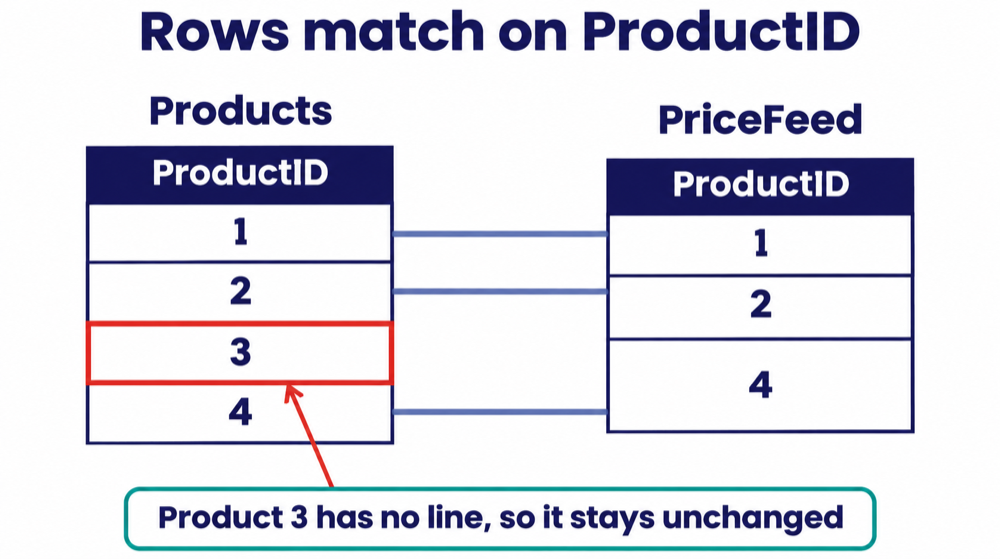
This small setup has a products table and a price feed. The feed covers three of the four products.
CREATE TABLE dbo.Products
(
    ProductID   int           NOT NULL PRIMARY KEY,
    ProductName nvarchar(50)  NOT NULL,
    ListPrice   decimal(10,2) NULL
);
INSERT dbo.Products (ProductID, ProductName, ListPrice) VALUES
 (1, N'Widget',   9.99),
 (2, N'Gadget',  19.99),
 (3, N'Gizmo',    4.50),
 (4, N'Doohickey', NULL);

CREATE TABLE dbo.PriceFeed
(
    ProductID int           NOT NULL PRIMARY KEY,
    NewPrice  decimal(10,2) NULL
);
INSERT dbo.PriceFeed (ProductID, NewPrice) VALUES
 (1, 10.99),
 (2, 19.99),   -- same as today
 (4, 7.25);    -- product 3 has no feed row
First, the SELECT. It shows the rows the update will change and the new values:
SELECT p.ProductID, p.ListPrice AS OldPrice, f.NewPrice
FROM dbo.Products AS p
INNER JOIN dbo.PriceFeed AS f ON f.ProductID = p.ProductID;| ProductID | OldPrice | NewPrice |
|---|---|---|
| 1 | 9.99 | 10.99 |
| 2 | 19.99 | 19.99 |
| 4 | NULL | 7.25 |
Product 3 is not in the list, because it has no feed row. So the update will leave it alone.
Option 1: UPDATE with FROM and a JOIN
Keep the FROM and JOIN from your SELECT. Swap the SELECT line for UPDATE and SET. This is the one I use most:
BEGIN TRANSACTION;

UPDATE p
SET    p.ListPrice = f.NewPrice
FROM   dbo.Products  AS p
INNER JOIN dbo.PriceFeed AS f ON f.ProductID = p.ProductID;

SELECT @@ROWCOUNT AS rows_updated;   -- 3

SELECT * FROM dbo.Products;

ROLLBACK TRANSACTION;   -- change to COMMIT TRANSACTION when the numbers look right
UPDATE p names the alias of the table that changes. The rest is your SELECT, unchanged.
It reports 3 rows. Products 1 and 4 get new prices, and product 3 keeps 4.50. Product 2 counts too, even though its price did not change. Option 1b below fixes that.
The transaction lets you look at the result before you keep it.
Option 1b: skip rows that already match
Add IS DISTINCT FROM to update only the rows whose value really changes:
BEGIN TRANSACTION;

UPDATE p
SET    p.ListPrice = f.NewPrice
OUTPUT inserted.ProductID, deleted.ListPrice AS OldPrice, inserted.ListPrice AS NewPrice
FROM   dbo.Products  AS p
INNER JOIN dbo.PriceFeed AS f ON f.ProductID = p.ProductID
WHERE  p.ListPrice IS DISTINCT FROM f.NewPrice;

SELECT @@ROWCOUNT AS rows_updated;   -- 2

ROLLBACK TRANSACTION; -- change to COMMIT TRANSACTION when the numbers look right| ProductID | OldPrice | NewPrice |
|---|---|---|
| 1 | 9.99 | 10.99 |
| 4 | NULL | 7.25 |
Now only 2 rows change. This matters if your table has triggers: a same-value update still fires them. In my test, an AFTER UPDATE trigger saw 3 rows without the filter and 2 with it.
IS DISTINCT FROM compares NULL like any other value, so row 4 (NULL to 7.25) still updates. It needs SQL Server 2022 or later. On older versions, use the EXISTS ... EXCEPT filter from Option 2.
The OUTPUT clause lists the old and new value of each changed row. It is the quickest way to check the result.
Option 2: UPDATE through a CTE
Put the SELECT in a CTE, run it on its own to check it, then update the CTE. The change goes to the base table.
WITH Changes AS
(
    SELECT c.Email, i.Email AS NewEmail,
           c.Phone, i.Phone AS NewPhone
    FROM   dbo.Customers AS c
    JOIN   dbo.CustomerImport AS i ON i.CustomerID = c.CustomerID
    -- skip rows that already match; EXCEPT treats two NULLs as equal
    WHERE  EXISTS (SELECT c.Email, c.Phone
                   EXCEPT
                   SELECT i.Email, i.Phone)
)
UPDATE Changes
SET    Email = NewEmail,
       Phone = NewPhone;
Here a customer table takes new emails and phone numbers from an import table. The WHERE EXISTS (... EXCEPT ...) line skips rows that already match, and it works on any version.
In my test, two rows changed and two matching rows stayed as they were. A CTE takes a few more lines than the join, because columns with the same name need an alias (NewEmail).
Option 3: UPDATE with a subquery
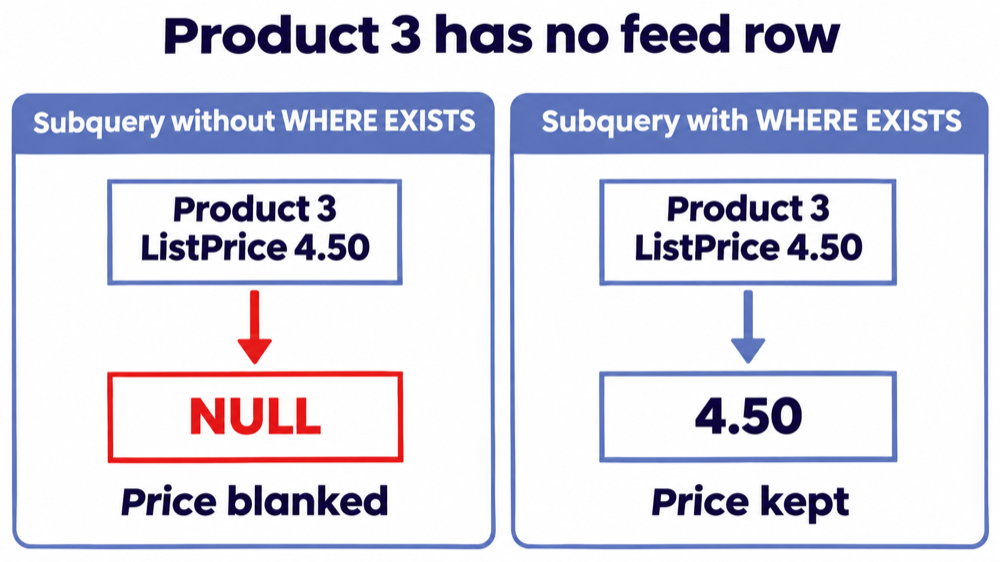
You can also set the column from a subquery. Add WHERE EXISTS, or rows with no match get NULL.
UPDATE dbo.Products
SET    ListPrice = (SELECT f.NewPrice FROM dbo.PriceFeed AS f WHERE f.ProductID = dbo.Products.ProductID)
WHERE  EXISTS (SELECT 1 FROM dbo.PriceFeed AS f WHERE f.ProductID = dbo.Products.ProductID);
Without the WHERE EXISTS line, product 3 went from 4.50 to NULL in my test. A LEFT JOIN in Option 1 does the same.
Option 4: MERGE
MERGE matches a source to a target. It can update, insert and delete in one statement.
MERGE dbo.Products AS p
USING dbo.PriceFeed AS f
   ON f.ProductID = p.ProductID
WHEN MATCHED AND p.ListPrice IS DISTINCT FROM f.NewPrice THEN
    UPDATE SET p.ListPrice = f.NewPrice
OUTPUT $action AS merge_action, inserted.ProductID, deleted.ListPrice AS OldPrice, inserted.ListPrice AS NewPrice;
On the sample tables it updates products 1 and 4 and leaves 2 and 3 alone. End it with a semicolon, or SQL Server stops with error 10713.
MERGE looks attractive, but I rarely use it:
- I use it for one-time jobs. A quick fix or a one-off data load is fine.
- I do not use it in a load that runs often or works on big tables. MERGE can be slow there.
- MERGE loads often get faster right away once rewritten. I have seen slow data warehouse loads built on MERGE. When we rewrote them as separate UPDATE, INSERT and DELETE statements, they ran faster at once.
More on that in our guide to ETL process optimization.
Watch for one row matching several source rows
If one target row matches several source rows, UPDATE ... FROM picks one value and gives no error. Microsoft says the result is undefined.
This price history table has two rows for product 1:
CREATE TABLE dbo.PriceHistory
(
    ProductID int           NOT NULL,
    NewPrice  decimal(10,2) NOT NULL,
    ChangedOn date          NOT NULL,
    CONSTRAINT PK_PriceHistory PRIMARY KEY (ProductID, ChangedOn)
);
INSERT dbo.PriceHistory VALUES
 (1, 10.49, '2026-11-01'),
 (1, 10.99, '2026-11-10'),   -- the one we want: newest
 (2, 21.00, '2026-11-05');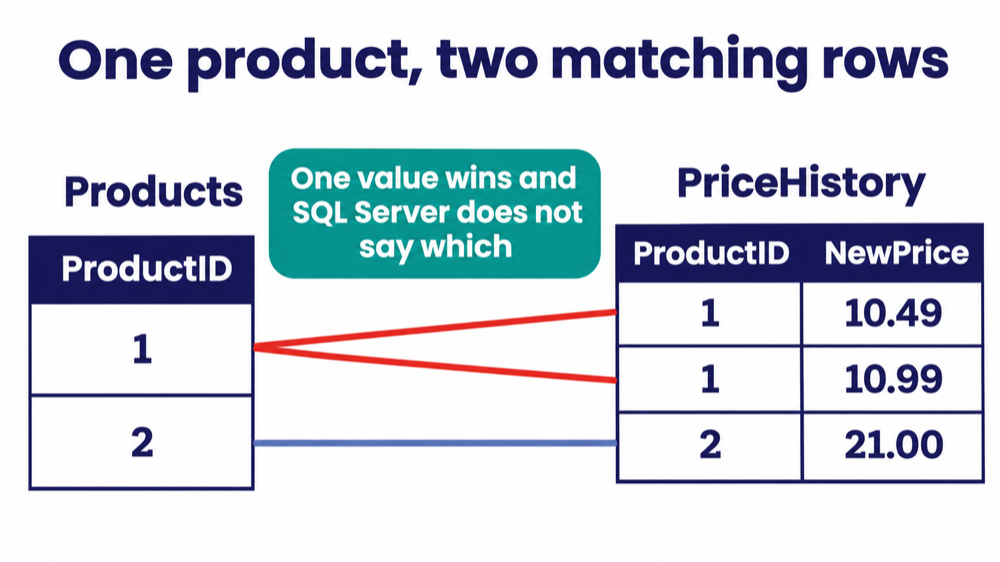
Run the join update against it:
UPDATE p
SET    p.ListPrice = h.NewPrice
FROM   dbo.Products AS p
INNER JOIN dbo.PriceHistory AS h ON h.ProductID = p.ProductID;
Product 1 got 10.49, the older price, and SQL Server said nothing. The row count was 2, which looks right.
The other options fail loudly on the same data:
| Method | What happened |
|---|---|
Option 1, UPDATE ... FROM | No error. Product 1 got 10.49. |
| Option 3, subquery | Error 512: the subquery returned more than 1 value. No row changed. |
Option 4, MERGE | Error 8672: it tried to update the same row more than once. No row changed. |
Fix it by keeping one source row per key. Here the newest price wins:
WITH Latest AS
(
    SELECT ProductID, NewPrice,
           ROW_NUMBER() OVER (PARTITION BY ProductID ORDER BY ChangedOn DESC) AS rn
    FROM   dbo.PriceHistory
)
UPDATE p
SET    p.ListPrice = l.NewPrice
FROM   dbo.Products AS p
INNER JOIN Latest AS l ON l.ProductID = p.ProductID AND l.rn = 1;
Now product 1 gets 10.99 and product 2 gets 21.00, every time. To find the problem keys before you update, run this on the source:
SELECT ProductID, COUNT(*) AS source_rows
FROM   dbo.PriceHistory
GROUP BY ProductID
HAVING COUNT(*) > 1;
Check the result before you commit
Use this order every time:
- Run the SELECT and read the rows.
- Run the duplicate-key check on the source.
- Start a transaction, run the UPDATE with
OUTPUT, and compare@@ROWCOUNTwith the SELECT. - Commit only when they match.