
Data loads
~1.5 GBless data read per run of the two loads
Three load procedures were slowing the server. Two of them now read 5–6x less data on every run.
Data read per run
BeforeAfter
Load_ArchitecturalUnits_TGF
Load_Issues_TGF
Source: 5 runs before and after for each procedure.
SQL Server tuning reduces CPU time and disk reads, which speeds up operations.
The problem
Slow stored procedures (SP) significantly affected the SQL Server's performance.
We identified multiple instances of SPs that were slow, and we are going to show 3 of them in detail below.
The improvements for these 3 stored procedures were the following:
Final thoughts
Such dramatic enhancements serve as a potent reminder of the power of SQL tuning.
Even minor adjustments can unleash significant performance gains, ensuring our systems run smoother, faster, and more efficiently.
Under the hood
Before and after, every measurement
Let's examine the gains from the tuning of each of the three stored procedures.
Stored procedure #1
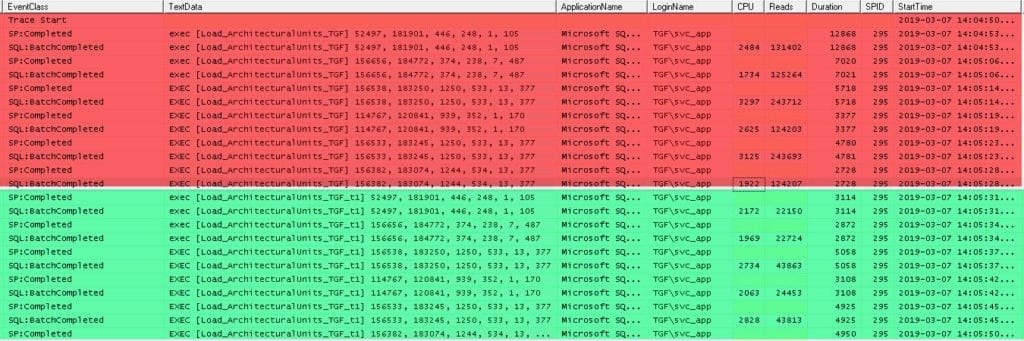
SP name: [Load_ArchitecturalUnits_TGF]
Here's the before-and-after snapshot that showcases the efficiency gains:
| Duration (ms) | CPU (ms) | Disk (8k page reads) | ||||
|---|---|---|---|---|---|---|
| Before | After | Before | After | Before | After | |
| Run 1 | 12,868 | 3,114 | 2,484 | 2,172 | 131,402 | 22,150 |
| Run 2 | 7,021 | 2,872 | 1,734 | 1,669 | 125,264 | 22,724 |
| Run 3 | 5,718 | 5,058 | 3,297 | 2,734 | 243,712 | 43,863 |
| Run 4 | 3,377 | 3,108 | 2,625 | 2,063 | 124,203 | 24,453 |
| Run 5 | 4,781 | 4,925 | 3,125 | 2,828 | 243,693 | 43,813 |
| AVG | 6,753 | 3,815 | 2,653 | 2,293 | 173,654 | 31,400 |
| Before | After | Improvement | |
|---|---|---|---|
| Duration (ms)* | 6,753 | 3,815 | 2x |
| CPU (ms)* | 2,653 | 2,293 | ~1.2x |
| Disk (number of reads)* | 173,654 | 31,400 | 6x |
[Load_ArchitecturalUnits_TGF] runsAfter tuning the stored procedure, it started running 77% faster with almost 6 times fewer disk reads.
Stored procedure #2
SP name: [Load_Issues_TGF]
Here's the before-and-after snapshot that showcases the efficiency gains:
| Duration (ms) | CPU (ms) | Disk (8k page reads) | ||||
|---|---|---|---|---|---|---|
| Before | After | Before | After | Before | After | |
| Run 1 | 6,510 | 789 | 6,062 | 610 | 42,971 | 5,234 |
| Run 2 | 1,690 | 255 | 1,656 | 188 | 12,486 | 3,331 |
| Run 3 | 14,423 | 2,937 | 12,547 | 2,344 | 93,788 | 17,484 |
| Run 4 | 979 | 420 | 921 | 172 | 7,844 | 3,398 |
| Run 5 | 23,561 | 4,979 | 11,953 | 2,281 | 93,705 | 17,452 |
| AVG | 9,432 | 1,876 | 6,627 | 1,119 | 50,158 | 9,379 |
| Before | After | Improvement | |
|---|---|---|---|
| Duration (ms)* | 9,432 | 1,876 | ~5x |
| CPU (ms)* | 6,627 | 1,119 | ~6x |
| Disk (number of reads)* | 50,158 | 9,379 | ~5x |
[Load_Issues_TGF] runsAfter tuning the stored procedure, it started running 5x faster with over 5 times fewer disk reads.
Stored procedure #3
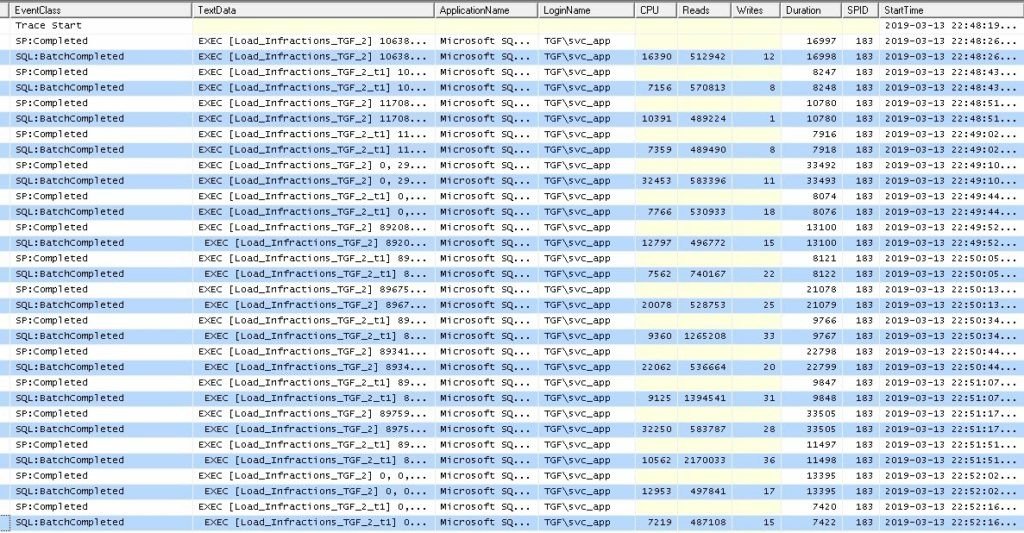
SP name: [Load_Infractions_TGF_2]
To improve the overall performance of this SP, we did the following steps:
- Added a filter for
@ClientIDin a CTE/Subquery. - Replaced two temp tables with variable tables.
- Removed
OPTION (RECOMPILE)query hint.
Here's the before-and-after snapshot that showcases the efficiency gains:
| Duration (ms) | CPU (ms) | Disk (8k page reads) | ||||
|---|---|---|---|---|---|---|
| Before | After | Before | After | Before | After | |
| Run 1 | 16,998 | 8,248 | 16,390 | 7,156 | 512,942 | 570,813 |
| Run 2 | 10,780 | 7,918 | 10,391 | 7,359 | 489,224 | 489,490 |
| Run 3 | 33,493 | 8,076 | 32,453 | 7,766 | 583,396 | 530,933 |
| Run 4 | 13,100 | 8,122 | 12,797 | 7,562 | 496,772 | 740,167 |
| Run 5 | 13,395 | 7,422 | 12,953 | 7,219 | 497,841 | 487,108 |
| AVG | 17,553 | 7,957 | 16,996 | 7,412 | 516,035 | 563,702 |
| Before | After | Improvement | |
|---|---|---|---|
| Duration (ms)* | 17,553 | 7,957 | ~2x |
| CPU (ms)* | 16,996 | 7,412 | ~2x |
| Disk (number of reads)* | 516,035 | 563,702 | - |
[Load_Infractions_TGF_2] runsAfter tuning the stored procedure, it started running ~2x faster.
Multiple indexing changes
We also tuned a bunch of other stored procedures.
Most of them got faster too. The table below shows each one, before and after.
Check out this table below that highlights some serious performance improvements for stored procedures.

Let's take a closer look at this table:
- avgCPU #1 column shows CPU cycles needed to run this stored proc before tuning.
- avgCPU #2 column shows CPU cycles needed to run this stored proc after tuning.
- Delta avgCPU column shows the difference between before tuning vs. after. If the number is negative, then the speed improved.
- avgReads #1 column shows Storage read operations needed to run this stored proc before tuning.
- avgReads #2 column shows Storage read operations to run this stored proc after tuning.
- Delta avgReads shows the difference between before vs. after. If the number is negative, then the speed improved.
- avgDuration #1 - shows duration with old indexes before IX changes.
- avgDuration #2 - shows duration after new indexing is deployed.
- The last column “Delta avgDuration” is the one that matters the most. It shows if stored procs are slower or faster.