


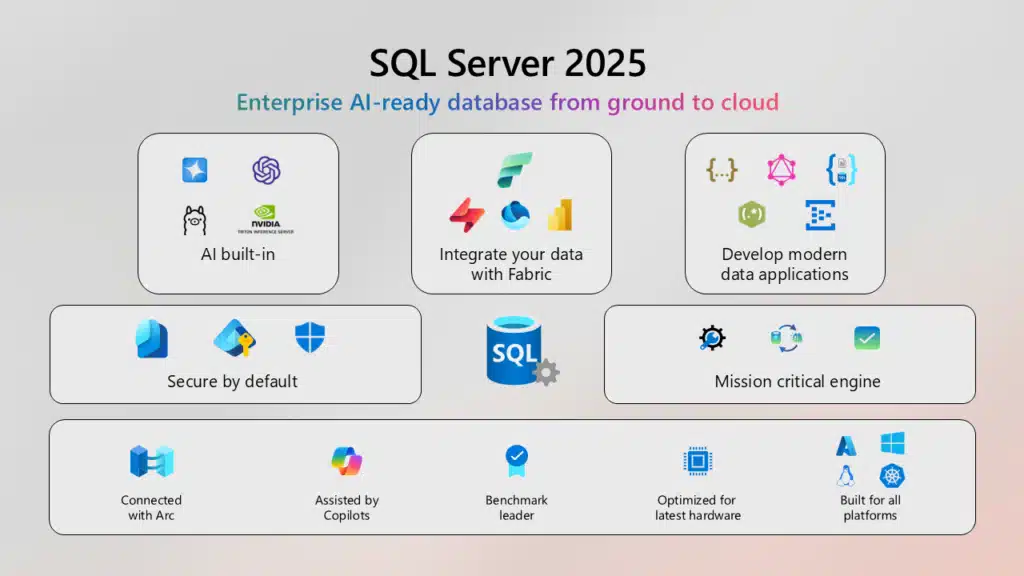
SQL Server 2025 is here and generally available since November 18, 2025. Microsoft isn’t shy about calling it their most developer-friendly release in a decade. Bob Ward, a Principal Architect for the Microsoft Azure Data team, said it best: this is “SQL Server AI-ready, enterprise-trusted, developer-focused, and cloud-connected—from ground to cloud to Fabric”.
With 10,000 organizations participating in the public preview and 100,000 active SQL Server 2025 databases already deployed, adoption momentum is stronger than any previous release.
So what’s actually new? And why should you care enough to plan an upgrade instead of sitting on 2019 or 2022 until auditors drag you forward? Let’s break it down.
AI in the Database
Yes, every product under the sun now has “AI,” but SQL Server 2025 actually ships with it. You get:
- Vector Search: SQL Server now supports creating vector embeddings inside the engine. Developers can generate embeddings from text, index them, and run similarity searches with T-SQL — no bolt-on Python hacks required.
- Hybrid Queries: You can combine vector-based similarity with traditional relational predicates for hybrid search. Think “find the top 10 semantically relevant matches, where region = North America.”
- Secure AI Models: Models run outside the core SQL engine, connected via model definitions. They can live on Azure OpenAI, on-prem open-source frameworks, or any OpenAI-compatible service. The engine stays secure and isolated.
- T-SQL as the Glue: Developers don’t need to learn a new stack. Everything — embedding creation, vector indexing, and hybrid search — runs in the same SQL syntax they already know.
For CIOs and CTOs: This is about enterprise governance. AI features run on SQL Server’s authentication, authorization, and encryption stack, so you can deploy intelligent search inside regulated environments without building a separate data stack.
Developers Finally Get Their Wishlist Granted
If you’ve been begging for JSON and RegEx, Microsoft finally listened. Abhiman Tiwari, a Senior Product Manager on the Azure SQL team at Microsoft, calls SQL Server 2025 “the best release for developers in a decade.” He’s not exaggerating.
Native JSON Type
- No more storing JSON as NVARCHAR(MAX).
- Native JSON data type with 2GB document support.
- Binary storage with indexes for faster retrieval.
- New functions:
JSON_MODIFY,JSON_CONTAINS,JSON_OBJECT_AGG,JSON_ARRAY_AGG. - JSON indexes accelerate filtering and joins on semi-structured data.
This makes SQL Server a first-class citizen for NoSQL-style workloads while preserving ACID guarantees.
Regex Support
- Native regex functions, fully POSIX-compliant.
- Functions like
REGEXP_LIKE,REGEXP_REPLACE,REGEXP_SUBSTR, plus regex-based split and count. - Check constraints can now enforce regex-based data integrity.
- Finally, data validation can live where it belongs: in the database, not in brittle app code.
Fuzzy String Matching
- Functions based on Levenshtein and Jaro-Winkler algorithms.
- Simplifies matching records with typos or inconsistent formatting.
- Use cases: deduplication, customer record cleanup, or fraud detection.
Other T-SQL Enhancements
CURRENT_DATEfunction.DATEADDwith BIGINT support.- Concatenation operator (
||) in line with ANSI SQL. - Base64 encode/decode.
PRODUCT()aggregate function.
Taken together, these updates remove friction for app developers, data engineers, and BI teams. They reduce the number of “workarounds” and let teams ship features faster with less technical debt.
And here’s the cherry: there’s now a Developer Edition that mimics Standard Edition.
Bob Ward called this out as a huge win for dev/test environments where teams were stuck licensing Standard just to get realistic behavior.
Enterprise Security by Default
SQL Server 2025 is the first release where “secure by default” actually means something.
Entra ID Integration
- Credential-free inbound and outbound connections.
- SQL Server 2025 instances can authenticate to Azure Storage, Key Vault, and REST APIs using managed identities.
- Simplifies key rotation and secret management.
- On-prem customers finally get parity with what’s been standard in Azure SQL.
Stronger Password Hashing
- PBKDF2 password hashing replaces the older SHA-based scheme. Your hashes are now practically brute-force proof, meeting stricter financial and government compliance.
Encrypted Connections Everywhere
- TDS 8.0 over TLS 1.3 now used not just for clients, but for internal SQL features (replication, availability groups, SQL Agent).
- Strict encryption is enforced by default.
Smarter Security Caching
- Security cache invalidation is now login-specific, not global.
- Reduces performance impact during user provisioning or permission changes.
- For enterprises with thousands of concurrent sessions, this means fewer CPU spikes during admin tasks.
The net: stronger compliance, less operational overhead, and fewer opportunities for misconfiguration.
Performance and Scale
Derek Wilson, a Principal Program Manager (PM) at Microsoft, summarized his team’s mission as: “Make things run faster, without you having to do anything.”
They shipped fixes that hit the exact pain points DBAs complain about:
- Optional Parameter Plan Optimization (
OPPO): Dodges bad cached plans without hand-tuned hacks. - Batch Mode for Built-Ins: Functions like
ABS(),SIN(),COS(), andDATE_TRUNC()now vectorize. Benchmarks show ~70% faster runtimes in CPU-bound queries—no code changes needed. - Optimized
sp_executesql: Treats ad hoc SQL compilations like stored procedures. ORM-heavy apps see fewer compile storms, less timeout risk, and steadier concurrency. - Optimized Locking: Less escalation, less blocking, more throughput.
- Optimize Halloween Protection: A fix for the 40-year-old DML bug. Replaces
tempdbspooling with Accelerated Data Recovery (ADR), slashing CPU by >50% on large updates. In Wilson’s demo, runtime dropped from 6s to under 3 andTempDBusage shrank by 80MB. - Real-World Performance Validation:
- Preliminary benchmarks on AMD EPYC processors with HPE hardware demonstrate measurable production gains:
- 10 TB workload: New world record for SQL Server
- 3 TB price/performance: 4% improvement compared to previous generation results
These aren’t “bench toys.” They kill the real bottlenecks—locking, spills, compile storms—and give DBAs something they rarely get from release notes: reasons to cheer.
Fabric Integration: Ground to Cloud to OneLake
SQL Server 2025 lands as a true bridge to Fabric.
Mirroring for SQL Server 2016–2022
- Uses Change Data Capture (CDC) to mirror on-prem SQL Server tables into Fabric OneLake.
- Near-real-time replication with low-latency analytics endpoints.
Mirroring for SQL Server 2025
- Uses Change Feed (same as Azure SQL) instead of CDC.
- Push model vs pull model: faster, more reliable.
- Requires an Arc agent with a managed identity for secure authentication.
- No CDC tables cluttering your source database.
Why It Matters
- Enterprises can replicate operational data to Fabric in near real time.
- Enables Power BI, Synapse, and AI workloads on live transactional data.
- Eliminates ETL sprawl while preserving governance.
For CFOs and IT directors: this reduces the cost of analytics infrastructure and shortens time-to-insight. Demand for that is near universal, with 88% of organizations using AI in at least one business function in 2025, per our data analytics statistics.
Availability and Mission-Critical Engine Features
Beyond the headlines, SQL Server 2025 packs over 40 new engine features across performance, HA/DR, and security.
- Optimized Locking: Eliminates blocking issues and reduces deadlocks.
- Query Store on Read Replicas: Extends observability to scale-out architectures.
- Resource Governor for tempdb: Prevents runaway workloads from consuming all tempdb resources.
- Always On Enhancements: Better failover diagnostics, tuning, and reliability.
- Cross-Platform: Windows, Linux, containers, Kubernetes — same features everywhere.
These changes make SQL Server 2025 a safer bet for mission-critical systems. High availability isn’t a bolt-on; it’s woven deeper into the engine. (For version history, cumulative updates, and past releases, check our SQL Server Builds page).
Should You Upgrade?
Let’s be blunt: if you’re on SQL Server 2019, you’ve probably been fine ignoring 2022. But SQL Server 2025 is harder to ignore:
- If you care about AI apps, 2025 is the first SQL Server that speaks your language.
- If you care about security compliance, the defaults alone might justify the upgrade.
- If you care about developer happiness, JSON + RegEx + fuzzy match + Standard Dev Edition will get you out of licensing purgatory.
- If you care about performance, Derek Wilson’s demos prove it’s not just incremental fluff.
(And if you’re planning the jump, our SQL Server Migrations & Upgrades service helps enterprises move safely, with minimal downtime.)
Edition Changes That Matter
Express Edition:
- Database limit increased from 10 GB to 50 GB
- AI features included (vector search, embeddings)
- Single unified edition (Express Advanced consolidated)
Standard Edition:
- Now supports 32 cores and 256 GB RAM (up from 24/128)
- Resource Governor included
- New Standard Developer Edition for free dev/test with full Standard feature parity
Web Edition Discontinued:
SQL Server 2022 is the final Web edition (supported until Jan 2033).
Migrate to Azure SQL for cost-effective web workloads or use Standard edition on-prem.
Final Thoughts
SQL Server 2025 is a leap forward in AI, security, and performance. For CIOs and CTOs, it’s an inflection point — the database you already trust, rebuilt for the next decade.
You can also watch Bob Ward’s interview on Data Exposed where he talks through the highlights of SQL Server 2025.
Frequently Asked Questions
Is SQL Server 2025 GA? Can I use it in prod yet?
Yes. SQL Server 2025 became generally available on November 18, 2025. It's production-ready. You can download it now or deploy directly on Azure VMs with optimized configurations.
What are the headline gains for the business?
Higher security by default, faster and more predictable performance, built-in AI search in T-SQL, and near real-time analytics via Microsoft Fabric without heavy ETL.
Do we need to move to Azure to benefit?
No. SQL Server 2025 runs fully on-prem. Azure Arc and Fabric are optional. You can adopt hybrid features on your timeline.
What AI features actually live in the engine?
Is this safe for regulated data?
Safer than prior releases. TDS 8.0 over TLS 1.3, stronger password hashing, Entra ID logins, and managed identity for outbound calls. You still need driver updates and policy enforcement.
Will we need query rewrites to see performance wins?
Often no. Intelligent Query Processing improvements, optional parameter plan optimization, batch-mode boosts for built-ins, optimized locking, and ad-hoc compile controls deliver benefits without code changes. Keep indexing hygiene and baselines.
How does 2025 help with parameter sniffing?
Optional parameter plan optimization and expanded IQP reduce “one bad plan for all” issues. Query Store hints and forced plans remain valid tools.
What changes for concurrency and tempdb pressure?
Optimized locking reduces blocking and lock escalation. Resource Governor controls can fence tempdb-heavy workloads. Expect fewer blast-radius incidents.
What is required for “encrypt by default” to work end-to-end?
Update client drivers and connection strings. Validate TLS 1.3 on servers, enable strict encryption, rotate certificates, and test Always On, replication, and Agent jobs with strict settings.
Can we authenticate to cloud services without stored secrets?
Yes. With Azure Arc you can assign a managed identity to the SQL host. Outbound calls from SQL can use that identity to Azure Storage or Key Vault. This removes local secrets.
Any changes in reporting?
Power BI Report Server is the on-prem report server for paginated and interactive reports. Entitlement depends on your licensing. Validate your SKU and Software Assurance.
What will break if we just “lift and shift” on day one?
Sources and Further Reading
- Official Release Overview – Get Microsoft’s full breakdown of SQL Server 2025 features and vision: aka.ms/sqlserver2025.
- SQL Server Management Studio 21 + Copilot – Try the updated SSMS and preview built-in Copilot assistance: aka.ms/ssms21.
- Detailed “What’s New” Docs – Explore Microsoft’s technical documentation covering all new features in depth: aka.ms/sqlserver2025docs.

