

What is a CPU Scheduler in SQL Server?
A query that you want to execute represents a task, your work. The execution context of your work is called a worker.
A task is assigned to a worker, which is assigned to a scheduler for execution on the CPU.
The manager of what gets on the CPU is called the scheduler, and there is one per logical processor.
Why should you care about it?
You have got CPUs, you pay for them, but your SQL Server may not use them all to process a workload.
Some CPU cores may not be accessible to SQL Server due to affinity masking or licensing problems.
How to check if there are CPU Schedulers offline?
You can use the query below. The sys.dm_os_schedulers return 0 when the schedulers are disabled.
SELECT *
FROM sys.dm_os_schedulers
WHERE scheduler_id < 255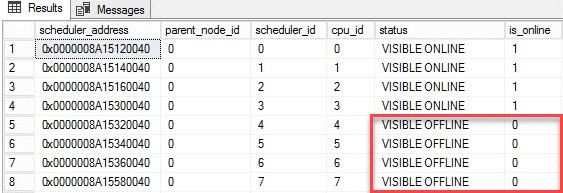
How to fix disabled CPU Schedulers
Do you know about your license limitations?
Each edition of SQL Server has a maximum number of sockets (or physical processors or processor packages) and a maximum number of cores.
Check the capacity limits of your SQL Server edition.
If you’re using affinity masking, make sure you know what you’re doing.
Do not configure CPU affinity in the Windows operating system and also configure the affinity mask in SQL Server.
You may have unpredictable results.
SQL Server CPU affinity is best configured using the sp_configure option in SQL Server.
When using virtualization, consider increasing the number of cores per virtual socket, this can be a simple software change.

