

Most organizations jump straight to complex security solutions like Transparent Data Encryption while ignoring fundamental security measures that take minutes to implement.
This comprehensive guide reveals the exact 12-step security hierarchy that protects enterprise SQL Server environments — starting with the easiest wins that deliver maximum protection.
The Million-Dollar Security Mistake I See Every Week
Picture this: A $50M healthcare company calls for a routine SQL Server consultation.
Within 5 minutes of our assessment, we discovered their patient database—containing sensitive medical records—was directly accessible from the internet. Any 16-year-old with basic hacking skills could have been brute-forcing their way in.
The client immediately ended our call to fix the vulnerability.
This scenario happens more often than you'd think. Companies spend thousands on complex encryption solutions while leaving their digital front door wide open. It's like installing a bank vault in a house with no walls.
After 15+ years optimizing SQL Server environments for Fortune 500 companies, I've seen this pattern repeatedly: organizations skip the fundamental security measures that provide 80% of protection for 20% of the effort.
Before you start on the Hierarchy, it might benefit you to read up on the Basics of Enterprise SQL Server Security.
The SQL Server Security Hierarchy: Low-Hanging Fruit First
Think of SQL Server security as a house.
You wouldn't install a sophisticated alarm system before putting locks on your doors. Yet that's exactly what most IT teams do with database security.
Here's the security hierarchy we recommend to enterprise clients, ranked by implementation difficulty and impact.
We’ve also written a short guide on Azure SQL & Security Best Practices.
Level 1: Disk Encryption
What it is: Encrypting the physical drives where your database files (MDF, LDF) and backups are stored.
Why it matters: If someone physically steals your server or hard drives, they can't access your data. This is especially critical for on-premises installations where someone could literally walk out with your storage devices.
Implementation:
- Windows: Use BitLocker or similar disk encryption
- Encrypt drives containing database files and backup locations
- Zero performance impact on modern hardware
Business justification: If you're involved in a data breach lawsuit, the first question asked is "Were your disks encrypted?" A "no" answer significantly increases liability.
Level 2: Backup Encryption
What it is: Encrypting database backup files (.BAK files) with certificates and keys.
Why it's dangerous to skip: Backup files are complete copies of your database. If someone copies your backup file, they've essentially stolen your entire database.
Implementation:
-- Create master key and certificate in master database
USE Master;

CREATE MASTER KEY ENCRYPTION BY PASSWORD = 'YourStrongPassword123!';

CREATE CERTIFICATE BackupCert
	WITH SUBJECT = 'Backup Certificate';

-- Create encrypted backup
BACKUP DATABASE YourDatabase TO DISK = 'C:\Backups\YourDatabase.bak'
WITH FORMAT
	,INIT
	,ENCRYPTION (
		ALGORITHM = AES_256
		,SERVER CERTIFICATE = BackupCert
		);
Key management: Rotate encryption keys regularly and ensure former employees no longer have access to backup keys.
Level 3: Sensitive Column Encryption
What it is: Encrypting specific columns containing sensitive data (credit card numbers, social security numbers, healthcare information).
The refrigerator analogy: SQL Server is like a refrigerator in your house. If thieves break into your house, they'll eventually get to your refrigerator. But if you've locked your milk in a safe inside the refrigerator, it's useless to them.
Implementation approaches:
- Option A: Use EncryptByKey, DecryptByKey, or Always Encrypted for column-level protection
- Option B: Third-party tokenization services (recommended for credit cards)
Advanced approach: Many organizations don't store sensitive data directly. Instead, they use third-party providers for tokenization, where sensitive data is replaced with non-sensitive tokens. Even if attackers breach your system, the tokens are useless without access to the tokenization service.
Level 4: Network Traffic Encryption
What it is: Encrypting communication between applications and SQL Server.
The vulnerability: SQL Server traditionally communicates over unencrypted protocols. Anyone with network access can use packet sniffers to capture and reassemble database traffic, potentially seeing sensitive data in transit.
Implementation:
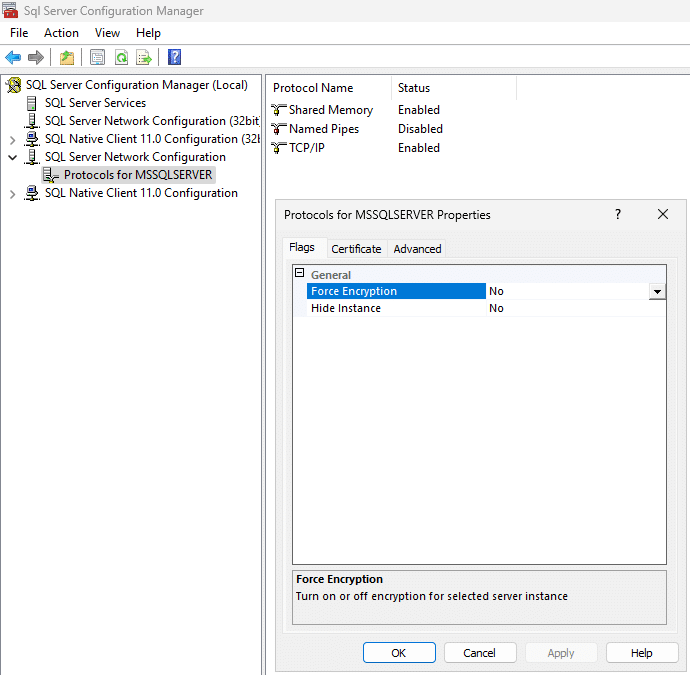
- Force encrypted connections in SQL Server Configuration Manager
- Use SSL/TLS certificates for all database connections
- Configure connection strings to require encryption
Steps to Implement:
- Open SQL Server Configuration Manager
- Go to SQL Server Network Configuration > Protocols for MSSQLSERVER
- Right-click Protocols for MSSQLSERVER > Properties
- Under the Flags tab, set Force Encryption to Yes
- Under the Certificate tab, select a valid SSL/TLS certificate
- Restart the SQL Server service
Level 5: Linked Server Security Audit
The hidden vulnerability: Reporting servers and other secondary systems often create linked server connections back to production with excessive privileges.
Why it's dangerous: DBAs often use sysadmin accounts for linked server connections because they're easier to configure. This creates a backdoor where someone accessing a reporting server can execute commands on production with full administrative privileges.
Assessment checklist:
- Audit all linked server connections pointing to production
- Verify privilege levels (should never be sysadmin)
- Implement least-privilege access for linked servers
- Document and regularly review linked server configurations
Level 6: SA Account Security
What it is: The 'sa' (system administrator) account is SQL Server's default admin account and a primary target for attackers.
The problem: Attackers know this account exists on every SQL Server installation. It's the first account they'll attempt to compromise.
Implementation steps:
- Never delete the SA account (this can cause system issues)
- Set a complex password: Use a long, random password
- Disable the account: Prevent any login attempts
- Rename the account: Change from 'sa' to something non-obvious
Warning: Never use the SA account for application connections. Applications should use dedicated service accounts with minimal required privileges.
Level 7: Least Privilege Access Design
What it is: Giving users and applications only the minimum permissions needed to perform their functions.
Common mistakes:
- Granting db_owner rights to report writers who only need SELECT access
- Using sysadmin accounts for application connections
- Not reviewing and removing unused permissions
Implementation framework:
- Analysts: SELECT access only for reporting databases
- Developers: CREATE, ALTER, DROP for development environments only
- Applications: Specific permissions for required stored procedures
- Admins: Limited administrative accounts for specific functions
Level 8: Network Isolation
The massive vulnerability: SQL Server instances exposed to the internet.
Real-world impact: We regularly find production SQL Servers with public IP addresses accessible from anywhere in the world. This is equivalent to putting your company's filing cabinets on the sidewalk.
Implementation:
- Configure firewalls to block external access to SQL Server ports (default 1433)
- Use internal IP addresses only
- Implement VPN access for remote administration
- Regular port scans to verify external inaccessibility
Cloud considerations: In Azure and AWS, double-check network security groups and firewall rules to ensure SQL Server isn't inadvertently exposed.
Level 9: RDP Access Controls
What it is: Restricting Remote Desktop Protocol access to SQL Server machines.
Performance impact: When administrators RDP directly to SQL Server machines, they consume system resources. Running browsers, management tools, and other applications on the database server impacts performance.
Security risks:
- Increased attack surface
- Potential for malware introduction
- Resource consumption affecting database performance
Best practices:
- Limit RDP access to emergency situations only
- Use hardened jump boxes or privileged access workstations (PAWs) for secure administrative access
- Implement session time limits
- Monitor and log all RDP sessions
Level 10: Login Monitoring and Alerting
What it is: Monitoring failed login attempts and suspicious access patterns.
Key metrics to monitor:
- Failed login attempts (especially large volumes)
- Successful logins from unusual locations
- Login attempts outside business hours
- Repeated failed attempts for SA account
Implementation:
- Configure SQL Server logging for failed authentications
- Set up alerts for failed login thresholds
- Review Windows Security Event logs
- Implement automated responses for brute-force attempts
Alert thresholds:
- 1-2 failed attempts: Likely user error
- 100+ failed attempts: Potential brute force attack requiring immediate investigation
Level 11: Data Access Abstraction
What it is: Using views, stored procedures, and schemas to create layers between users and raw data.
Implementation approaches:
- Views: Create security views that filter sensitive columns
- Stored procedures: Control data access through parameterized procedures
- Schemas: Organize security permissions at the schema level
Benefits:
- Prevents direct table access
- Enables row-level security
- Simplifies permission management
- Provides audit trails for data access
Example:
-- Instead of direct table access
SELECT *
FROM CreditCards;

-- Use security view
CREATE VIEW vw_CreditCards_Secure
AS
SELECT CustomerID
	,LEFT(CardNumber, 4) + 'XXXX-XXXX-' + RIGHT(CardNumber, 4) AS MaskedCardNumber
	,ExpirationDate
FROM CreditCards;
Level 12: Transparent Data Encryption
What it is: Encrypting the entire database, including data files, log files, and backup files.
Why it's last, not first: TDE is complex, performance-intensive, and protects data at rest, but does not prevent access by authorized logins or protect data in use. If someone breaks into your "refrigerator" (SQL Server) while it's running, they can still execute SELECT * FROM CreditCards and get all your data.
Critical warnings:
- Key management is crucial: Lose your encryption keys, lose your database forever
- Performance impact: 5-15% performance degradation
- Backup complexity: Encrypted backups require key management
- Not a complete solution: Doesn't protect against insider threats or application-level attacks
Implementation considerations:
-- Create database master key
CREATE MASTER KEY ENCRYPTION BY PASSWORD = 'YourVeryStrongPassword123!';

-- Create certificate for TDE
CREATE CERTIFICATE TDECert
	WITH SUBJECT = 'TDE Certificate';

-- Create database encryption key
USE YourDatabase;

CREATE DATABASE ENCRYPTION KEY
	WITH ALGORITHM = AES_256 ENCRYPTION BY SERVER CERTIFICATE TDECert;

-- Enable TDE
ALTER DATABASE YourDatabase

SET ENCRYPTION ON;
Key management best practices:
- Store certificates and keys in secure, separate locations
- Regular key rotation schedule
- Document key recovery procedures
- Test key recovery processes
Bonus Tip: There’s No Official Priority Order
Although this guide outlines 12 progressive security layers, Microsoft doesn’t publish an official ranking of which SQL Server protections are most important.
That’s because every environment is different, regulated industries, cloud-first architectures, or legacy on-prem deployments all have unique risk profiles.
Here are a few official resources worth bookmarking:
- Security for SQL Server Database Engine and Azure SQL Database
- SQL Server Security best practices
- SQL Server Encryption
Why Most Companies Get This Backwards
The pattern is consistent across industries: companies jump straight to Level 12 (Transparent Data Encryption) while ignoring Levels 1-11. This happens because:
- TDE sounds impressive in vendor presentations and board meetings
- Compliance checkboxes - some regulations mention encryption without specifying the type
- Vendor pressure - complex solutions generate more revenue
- Misunderstanding threat models - focusing on data-at-rest while ignoring access controls
The reality: A properly configured Level 1-11 environment provides better security than TDE alone, with significantly less complexity and cost.
Here’s a more thorough breakdown of preventing SQL injections.
Implementation Effort and Impact: What to Expect
Foundational controls (disk encryption, backup encryption, access controls):
Usually quicker to implement and with minimal performance impact on modern hardware. These provide significant protection with relatively low effort and cost
Intermediate measures (column-level encryption, network encryption, auditing):
Typically require more planning and testing. May introduce small performance overhead, depending on workload and encryption methods used.
Advanced solutions (Transparent Data Encryption, complex auditing, network isolation):
Demand thorough design, coordination, and key management. Implementation can take days or weeks, with a measurable but manageable impact on system performance.
Cost-Benefit Analysis
Low-hanging fruit (Levels 1-6):
- $0 in licensing for most implementations
- Fast deployment (depending on your environment)
- Covers ~80-90% of common attack vectors
Complex solutions (Level 7-12):
- May require additional licensing (e.g., Enterprise Edition for TDE)
- Longer implementation time (especially in legacy or hybrid environments)
- Covers more advanced threats, but with diminishing returns
The math is clear: start with the basics.
Common Implementation Mistakes
Mistake 1: Skipping Key Management
Problem: Implementing encryption without proper key management procedures
Solution: Document key rotation, backup, and recovery procedures before implementing encryption
Mistake 2: Over-Privileged Service Accounts
Problem: Using sysadmin accounts for application connections
Solution: Create dedicated service accounts with minimal required permissions
Mistake 3: Inadequate Monitoring
Problem: Implementing security controls without monitoring their effectiveness
Solution: Set up comprehensive logging and alerting for all security events
Mistake 4: Compliance-Driven Security
Problem: Focusing on compliance requirements rather than actual security
Solution: Implement defense-in-depth strategies that exceed compliance minimums
Industry-Specific Considerations
Healthcare (HIPAA)
- Priority: Column encryption for PHI
- Requirement: Audit trails for all data access
- Focus: Access controls and user authentication
Financial Services (SOX, PCI-DSS)
- Priority: Network isolation and encryption
- Requirement: Least privilege access
- Focus: Transaction integrity and fraud prevention
Government/Defense
- Priority: Comprehensive encryption at all levels
- Requirement: Multi-factor authentication
- Focus: Insider threat protection
Measuring Security ROI
Traditional ROI calculations don't apply to security—it's like asking for the ROI of changing your car's oil. The real metric is risk mitigation:
- Cost of implementation: $0-5,000 for most small-to-medium businesses
- Cost of data breach: $4.45 million average (IBM 2024 Cost of Data Breach Report)
- Probability reduction: 80-90% with proper implementation
So even a 10% reduction in breach probability justifies the investment.
Next Steps for Your Organization
Immediate Actions (This Week)
- Audit current state:Run the security assessment queries provided
- Implement quick wins: Start with disk encryption and SA account security
- Document findings: Create a security roadmap for your environment
30-Day Security Sprint
- Week 1: Levels 1-3 (Disk, backup, and column encryption)
- Week 2: Levels 4-6 (Network, linked servers, SA account)
- Week 3: Levels 7-9 (Access controls, network isolation, RDP)
- Week 4: Levels 10-12 (Monitoring, abstraction, TDE if needed)
Long-Term Strategy
- Quarterly security reviews: Assess new vulnerabilities and threats
- Annual penetration testing: Validate security control effectiveness
- Continuous monitoring: Implement automated security monitoring
Staff training: Ensure all team members understand security protocols
Frequently asked questions
Should we implement TDE first since it sounds most comprehensive?
How often should we rotate encryption keys?
What’s the performance impact of implementing all these security measures?
How do we know if our SQL Server is exposed to the internet?
Should we hire a dedicated security consultant or handle this internally?
How do we prioritize security measures with limited time and budget?
What’s the biggest security mistake you see in SQL Server environments?
How do we handle security in cloud environments like Azure SQL?
Bottom Line: Stop chasing complex security solutions while ignoring the fundamentals. A systematic approach starting with the lowest-hanging fruit provides maximum protection with minimum complexity. Your SQL Server environment is only as secure as its weakest link—and that's usually not the encryption algorithm.

