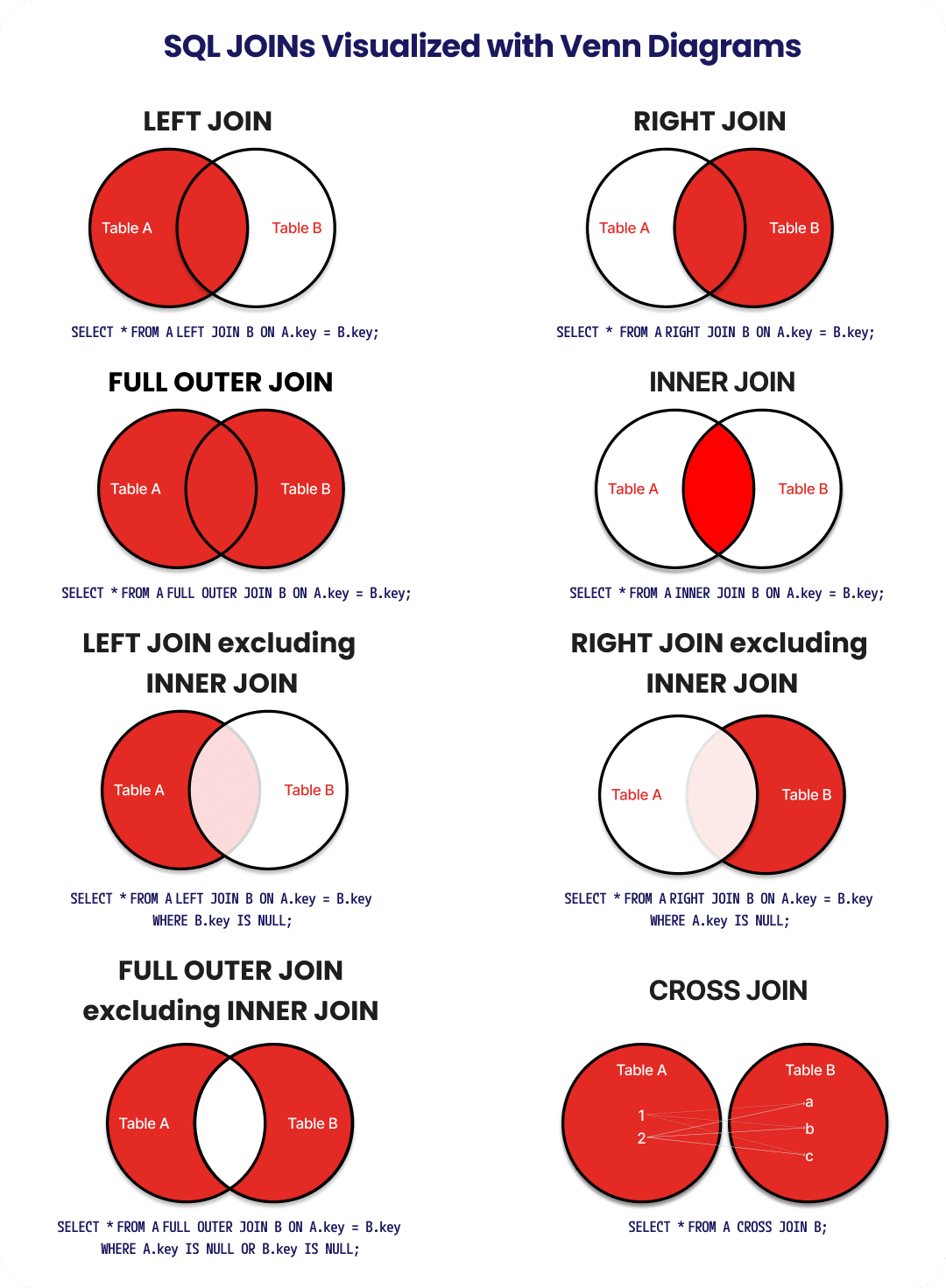
Understanding how data connects across tables is at the core of relational data management. The SQL JOINs Venn Diagram in this guide serves as a visual roadmap to that logic.
Use it to write optimized queries, improve database performance, and avoid common JOIN mistakes.

Visual Venn Diagram Breakdown
Understanding how different tables relate to each other is the cornerstone of effective database querying. Below, we’ll break down each SQL JOIN type, including INNER JOIN, LEFT JOIN, RIGHT JOIN, FULL OUTER JOIN, and more—with clear visual representations, practical examples, and real-world use cases.
INNER JOIN: Finding the Perfect Match
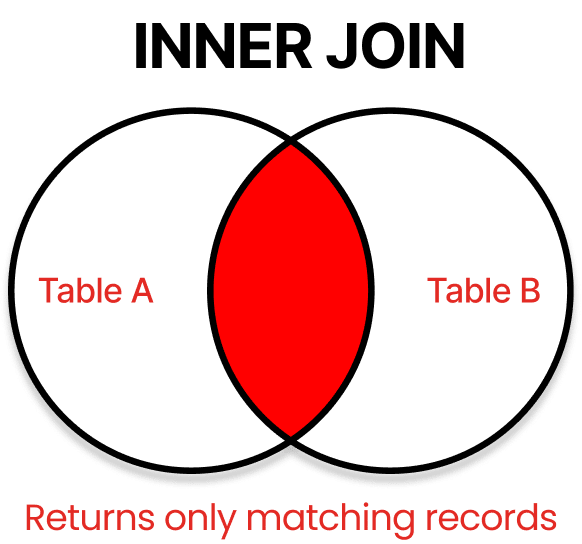
INNER JOIN is the most commonly used JOIN type and represents the intersection between two tables – returning only records that have matching values in both tables.

When to Use INNER JOIN
Use INNER JOIN when you need to find records that exist in both tables simultaneously. This is perfect for scenarios like:
- Matching customers with their orders
- Finding employees who work in specific departments
- Retrieving products that belong to particular categories
INNER JOIN in Action
Let’s examine a practical example using two common database tables: Customers and Orders.
SELECT Customers.CustomerName
,Orders.OrderID
FROM Customers
INNER JOIN Orders ON Customers.CustomerID = Orders.CustomerID
ORDER BY Customers.CustomerName;What this query does:
- Connects customers with their orders
- Returns only customers who have placed at least one order
- Excludes customers with no order history
The result will show each customer’s name paired with their order ID, but any customer without orders will be completely absent from the results.
LEFT JOIN: Keep Everything from Table A
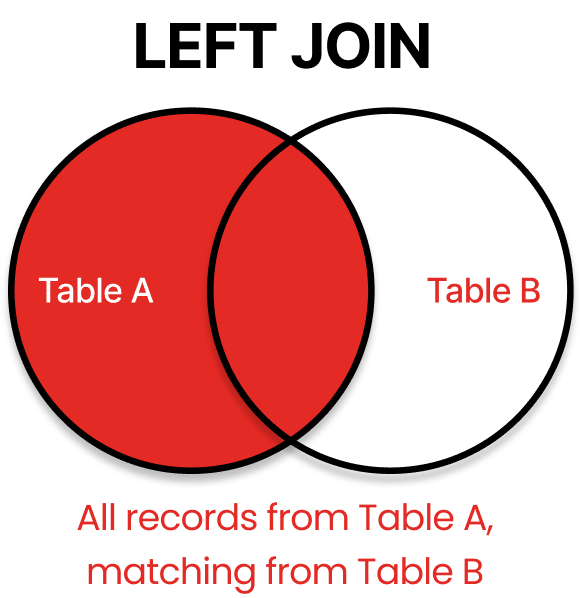
LEFT JOIN (also called LEFT OUTER JOIN) preserves all records from the left table while including matching records from the right table. For records without matches, NULL values appear in the right table columns.

Real-World LEFT JOIN Applications
LEFT JOIN shines when you need to:
- Find all customers and any orders they might have
- Identify users who haven’t completed certain actions
- Generate reports that must include all records from a primary table
- Perform gap analysis to find missing relationships
LEFT JOIN Example
SELECT Customers.CustomerName
,Orders.OrderID
FROM Customers
LEFT JOIN Orders ON Customers.CustomerID = Orders.CustomerID
ORDER BY Customers.CustomerName;This query returns:
- All customers from the Customers table
- Order IDs for customers who have placed orders
- NULL values in the OrderID column for customers without orders
LEFT JOIN is particularly valuable for data analysis when you need to ensure no records from your primary dataset are excluded.
RIGHT JOIN: Prioritize Table B
RIGHT JOIN (or RIGHT OUTER JOIN) functions as the mirror image of LEFT JOIN, keeping all records from the right table and matching records from the left table. Any unmatched records from the left table won’t appear, while unmatched right table records show NULL values in the left columns.

Though less common than LEFT JOINs, RIGHT JOINs are useful when:
- Your query logic flows more naturally from right to left
- You’re working with legacy database designs
- You need to preserve all records from a secondary table
- Creating complex queries with multiple JOIN operations
RIGHT JOIN in Practice
SELECT Orders.OrderID
,Customers.CustomerName
FROM Customers
RIGHT JOIN Orders ON Customers.CustomerID = Orders.CustomerID
ORDER BY Orders.OrderID;This query ensures that:
- All orders appear in the results
- Orders with corresponding customer information show the customer name
- Orders without a matching customer (perhaps due to data deletion) show
NULLin theCustomerNamefield
FULL OUTER JOIN: Leave Nothing Behind
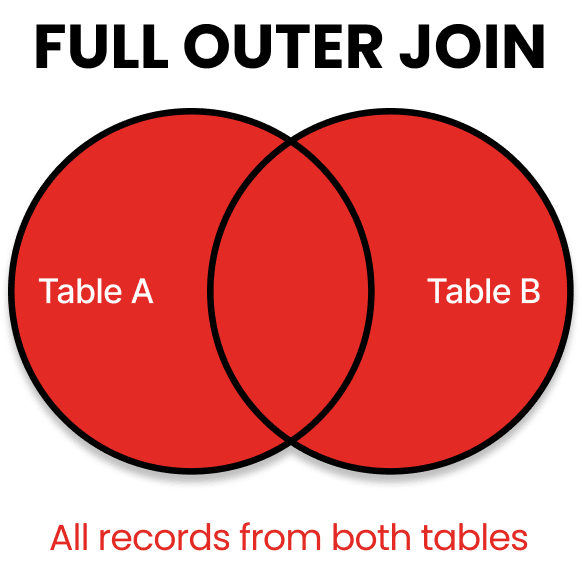
FULL OUTER JOIN combines the results of both LEFT and RIGHT JOINs, returning all records from both tables with matching records from opposite tables where available. When no match exists, NULL values appear in the columns from the table without a match.

FULL OUTER JOIN Applications
This comprehensive JOIN type is perfect for:
- Data integrity checks across systems
- Complete data reconciliation between tables
- Finding orphaned records in either direction
- Creating complete datasets regardless of relationship status
FULL OUTER JOIN Demonstration
SELECT Customers.CustomerName
,Orders.OrderID
FROM Customers
FULL OUTER JOIN Orders ON Customers.CustomerID = Orders.CustomerID
ORDER BY Customers.CustomerName;The results will contain:
- All customers (with or without orders)
- All orders (with or without matching customers)
NULLvalues where relationships don’t exist
FULL OUTER JOIN is especially useful when migrating between systems or performing comprehensive data audits.
CROSS JOIN: The Cartesian Product
Unlike the previous JOINs, CROSS JOIN doesn’t use a joining condition. Instead, it creates a Cartesian product, generating all possible combinations by pairing each row from the first table with every row from the second table.

When CROSS JOIN is Valuable
While potentially creating large result sets, CROSS JOIN serves specific purposes:
- Generating combination tables (e.g., all possible product-color combinations)
- Creating test data with complete permutations
- Building comparison matrices
- Supporting certain types of statistical analysis
CROSS JOIN Example
SELECT Products.ProductName
,Colors.ColorName
FROM Products
CROSS JOIN Colors
ORDER BY Products.ProductName
,Colors.ColorName;If Products has 10 rows and Colors has 5 rows, this query will generate 50 result rows (10 × 5), representing every possible product-color combination.
SELF JOIN: A Table Meets Itself
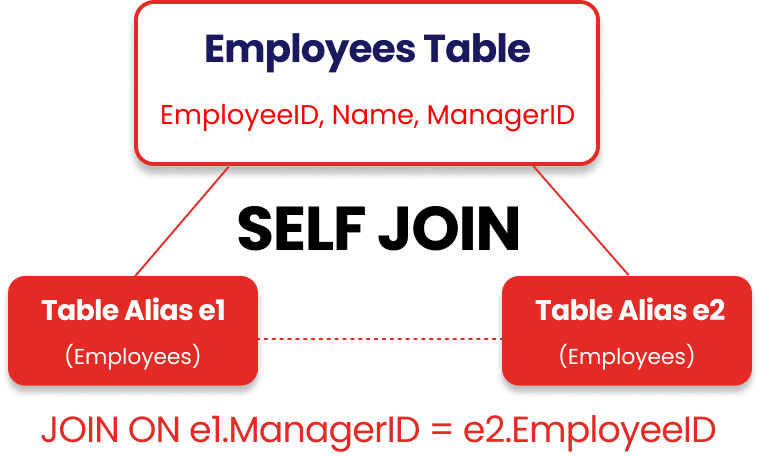
A SELF JOIN occurs when a table joins with itself, treating the same table as if it were two separate tables. This requires using table aliases to distinguish between the two instances of the same table.

Practical SELF JOIN Applications
SELF JOINs excel at handling:
- Hierarchical data (employees and managers from the same employee table)
- Finding relationships within the same dataset (customers who live in the same city)
- Comparing rows within a single table (products with the same category)
- Sequential analysis (finding consecutive dates or events)
SELF JOIN in Code
SELECT e1.EmployeeName AS Employee
,e2.EmployeeName AS Manager
FROM Employees e1
JOIN Employees e2 ON e1.ManagerID = e2.EmployeeID
ORDER BY e1.EmployeeName;This query:
- Treats the Employees table as two different tables (e1 and e2)
- Connects employees with their managers
- Creates a clear reporting structure from a single table
SELF JOINs illustrate the flexibility of SQL’s relational model, allowing single data sources to reveal complex relationships.
Understanding JOIN Selection: The Decision Tree
Choosing the right JOIN type is crucial for query accuracy and performance. Use this simplified decision tree to guide your selection:
- Need only matching records from both tables? →
INNER JOIN - Need all records from Table A with any matches from Table B? →
LEFT JOIN - Need all records from Table B with any matches from Table A? →
RIGHT JOIN - Need all records from both tables, regardless of matches? →
FULL OUTER JOIN - Need all possible combinations between tables? →
CROSS JOIN - Need to relate records within the same table? →
SELF JOIN
By mastering these JOIN types and understanding their visual representations, you’ll dramatically improve your data manipulation capabilities and unlock deeper insights from your relational databases.
7 Critical SQL JOIN Mistakes That Are Sabotaging Your Queries (And How to Fix Them)
Even experienced SQL developers can fall prey to common JOIN mistakes that lead to incorrect results, poor performance, or complete query failure. By understanding these pitfalls, you can write more robust and efficient queries.
Let’s examine the most dangerous JOIN mistakes and their solutions.
1. The Silent Performance Killer: Unintentional Cross Joins
One of the most devastating mistakes occurs when you accidentally create a cross join by forgetting to specify the JOIN condition altogether.
-- PROBLEMATIC QUERY: Missing JOIN condition
SELECT customers.name
,orders.order_date
FROM customers
,orders;This innocent-looking query creates a Cartesian product of both tables, returning millions of rows if your tables are large. What makes this particularly dangerous is that many database systems will execute this query without warning.
How to Fix It:
-- CORRECT QUERY: With proper JOIN condition
SELECT customers.name
,orders.order_date
FROM customers
JOIN orders ON customers.customer_id = orders.customer_id;Always explicitly define your JOIN conditions and consider setting your SQL client to show execution plans before running queries. This habit can save you from bringing your database server to its knees.
2. The Data Explosion: Missing JOIN Conditions With Modern Syntax
Even when using explicit JOIN syntax, forgetting the ON clause creates the same Cartesian product problem:
-- PROBLEMATIC QUERY: Missing ON clause
SELECT customers.name
,orders.order_date
FROM customers
JOIN orders;This mistake is especially common when refactoring queries or when working with multiple JOINs, where it’s easy to miss a condition.
How to Fix It:
Most modern database systems will now throw an error with this syntax, but some might still execute it. Double-check every JOIN has its corresponding ON clause before executing, and use proper indentation to make missing conditions more visible:
-- CORRECT QUERY: Properly formatted
SELECT customers.name
,orders.order_date
FROM customers
JOIN orders ON customers.customer_id = orders.customer_id;3. The Sequence Illusion: JOIN Ordering Misconceptions
Many developers believe the order of tables in JOIN operations affects performance. While JOIN order can matter for readability, modern database query optimizers typically determine the most efficient join sequence regardless of how you write it.
-- These two queries will typically have the same execution plan
SELECT *
FROM small_table
JOIN large_table ON small_table.id = large_table.id;SELECT *
FROM large_table
JOIN small_table ON small_table.id = large_table.id;The Real Solution:
Instead of worrying about table order, focus on:
- Creating proper indexes on
JOINcolumns - Providing helpful query hints when necessary (but only when you’ve confirmed they help)
- Analyzing actual execution plans to understand how your database processes JOINs
Let the database engine’s optimizer do its job—it’s typically better at determining optimal join strategies than intuition alone.
4. The Case Conundrum: Sensitivity Issues in JOIN Conditions
When joining tables with string columns, case sensitivity can cause unexpected missing results. This issue is particularly sneaky because your query executes without errors, but silently excludes records.
-- PROBLEMATIC QUERY: Case-sensitive join on potentially mixed-case data
SELECT users.username
,profiles.bio
FROM users
JOIN profiles ON users.username = profiles.username;If “JohnDoe” exists in one table and “johndoe” in another, this JOIN will miss that match in case-sensitive collations.
How to Fix It:
-- CORRECT QUERY: Case-insensitive comparison
SELECT users.username
,profiles.bio
FROM users
JOIN profiles ON UPPER(users.username) = UPPER(profiles.username);Better yet, standardize case handling in your database design and use the appropriate collation settings to ensure consistent behavior.
5. The NULL Trap: Improper NULL Handling in JOINs
NULL values require special handling in JOIN conditions because, in SQL, NULL != NULL. This behavior means that rows with NULL in join columns won’t match—even if both sides contain NULL.
-- PROBLEMATIC QUERY: Nulls won't match with standard equality
SELECT employees.name
,departments.name
FROM employees
JOIN departments ON employees.dept_id = departments.id;How to Fix It:
For INNER JOINs, you might want to exclude NULL values with a WHERE clause. For OUTER JOINs, you may need to use COALESCE or ISNULL functions:
-- CORRECT QUERY: Handling possible NULL values
SELECT employees.name
,departments.name
FROM employees
LEFT JOIN departments ON COALESCE(employees.dept_id, - 1) = COALESCE(departments.id, - 1);Alternatively, enforce NOT NULL constraints on join columns during database design to prevent this issue entirely.
6. The Multi-Column Join Oversight
When tables require joining on multiple columns, developers sometimes make the mistake of using AND versus the correct ON syntax:
-- PROBLEMATIC QUERY: Incorrect multi-column join
SELECT *
FROM order_items
JOIN inventory
WHERE order_items.product_id = inventory.product_id
AND order_items.warehouse_id = inventory.warehouse_id;How to Fix It:
-- CORRECT QUERY: Proper multi-column join
SELECT *
FROM order_items
JOIN inventory ON order_items.product_id = inventory.product_id
AND order_items.warehouse_id = inventory.warehouse_id;Always use the ON clause for JOIN conditions and the WHERE clause for filtering. This distinction keeps your query logic clean and prevents confusion.
7. The Accidental Filtering: WHERE vs. ON Clause Confusion
The difference between filtering in the ON clause versus the WHERE clause becomes critical in OUTER JOINs:
-- QUERY A: Filtering in ON clause
SELECT customers.name
,orders.order_date
FROM customers
LEFT JOIN orders ON customers.customer_id = orders.customer_id
AND orders.order_date > '2025-01-01';-- QUERY B: Filtering in WHERE clause
SELECT customers.name
,orders.order_date
FROM customers
LEFT JOIN orders ON customers.customer_id = orders.customer_id
WHERE orders.order_date > '2025-01-01';These queries produce dramatically different results!
Query A returns all customers with matched orders after the date (plus all customers without orders), while Query B returns only customers with orders after the date.
How to Fix It:
Understand the difference between join conditions and filters:
- Use
ONclauses for specifying how tables relate to each other - Use
WHEREclauses for filtering the final result set
When using LEFT or RIGHT JOINs, carefully consider whether you want to filter the secondary table before or after the JOIN operation.
Elevate Your SQL Performance With Strategic JOIN Selection
Mastering SQL JOINs is key to writing efficient, optimized queries that enhance data relationships and database performance. By understanding INNER, OUTER, LEFT, RIGHT, FULL, CROSS, and SELF JOINs, you can ensure precise data retrieval while avoiding common pitfalls like unintentional Cartesian products and NULL handling issues.
To take your SQL optimization skills further, leverage indexing, execution plans, and query tuning strategies for peak performance.
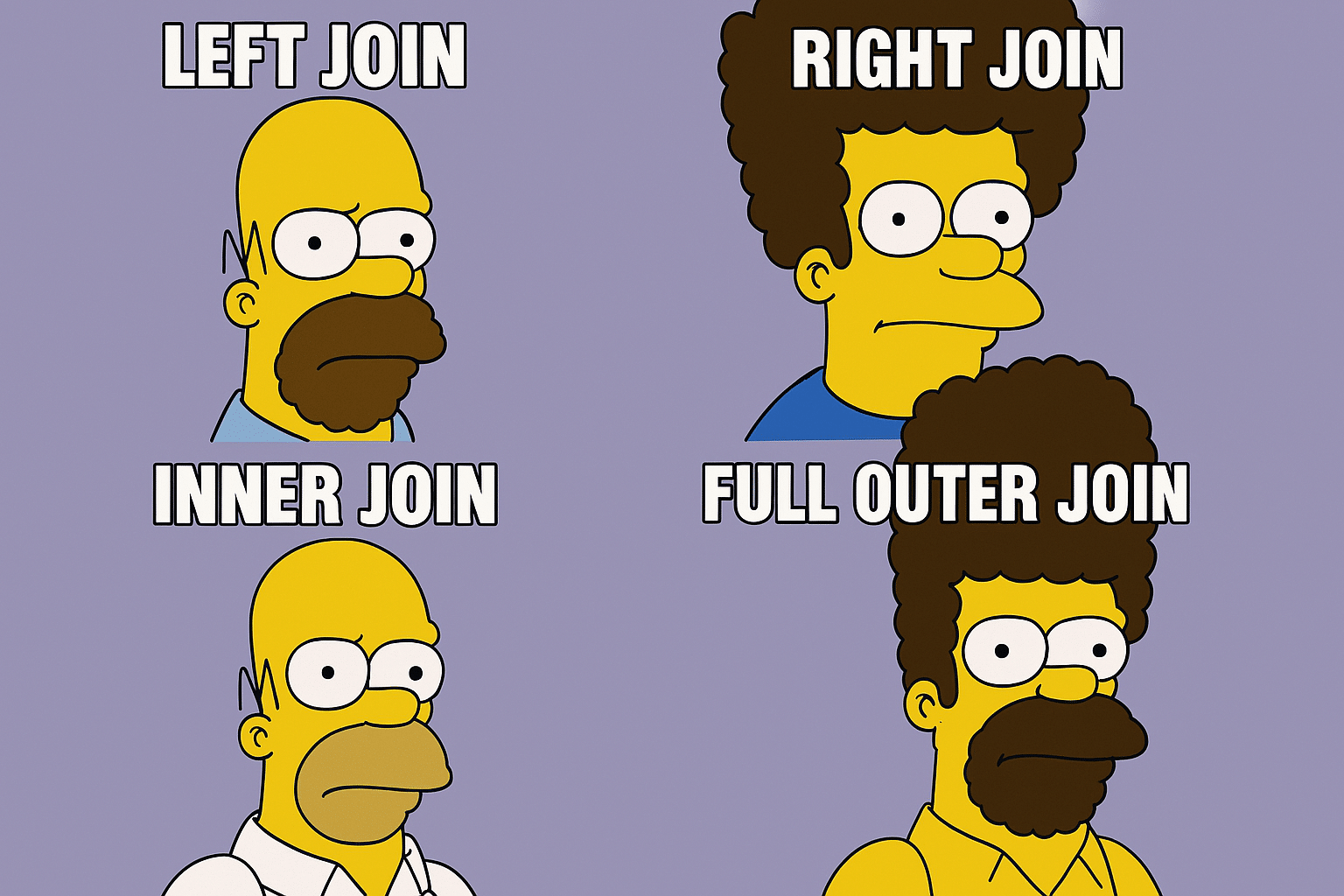
And if you need a quick way to remember the core JOIN types, this one sticks:

Frequently Asked Questions
How do query hints affect JOIN behavior across different database platforms?
JOIN execution. SQL Server uses OPTION (FORCE ORDER) to preserve join sequence, while PostgreSQL offers /*+ NESTLOOP */ style hints. Oracle implements /*+ LEADING */ for table order control. Use hints only when empirical testing confirms performance advantages over the optimizer’s default choices.
What’s the difference between hash joins and merge joins?
How do anti-joins and semi-joins differ from regular JOINs?
EXISTS), while anti-joins return rows where no match exists (like NOT EXISTS). Both avoid duplicate rows and are typically implemented using EXISTS, NOT EXISTS, or LEFT JOIN with NULL checks. They’re more efficient than regular joins when you only need to test for the presence or absence of related data.
What techniques work best for optimizing JOINs with temporal data?
FOR SYSTEM_TIME or PostgreSQL’s range types with overlap operators. Consider pre-materializing join boundaries at regular intervals for high-volume time-series data.
How can JOINs be optimized in a sharded database environment?
When should OUTER JOINs be preferred over UNION approaches?
OUTER JOINs when you need to preserve all records from one table while showing matching records from another. Choose UNION approaches when combining results from entirely separate queries. OUTER JOINs typically offer better performance when the base tables have appropriate indexes, while UNION is cleaner for merging results from different sources or structures.
Speak with a SQL Expert
In just 30 minutes, we will show you how we can eliminate your SQL Server headaches and provide operational peace of mind