SQL Server Consultants in Atlanta, GA

Senior-only DBAs serving Atlanta and the metro from our Alpharetta office. We tune, manage, and rescue SQL Server: responsive, remote-capable, and specialized, because SQL Server is all we do.

4.9 rating
120+ reviews
15+ yrs avg DBA experience
15-min emergency response

Talk to a senior DBA

This field is for validation purposes and should be left unchanged.

By clicking, you agree to our Terms of Use and Privacy Notice.

Questions? Call a senior DBA at (770) 821-9050

In short

Red9 provides senior-only SQL Server consulting, managed services, emergency support, and performance tuning for Atlanta and the metro area, including Alpharetta, Marietta, Sandy Springs, and Buckhead. SQL Server is all we do. We work with 120+ clients from startups to the Fortune 100, answer production emergencies in 15 minutes, and prove every result with before and after numbers. Looking for a SQL Server consultant near you in Atlanta? Start with a free assessment.

Trusted by 120+ companies, from Atlanta startups to the Fortune 100

Siemens logo Coca-Cola logo NCR logo Sony logo Brandeis University logo
Built for Atlanta

SQL Server Expertise for Atlanta's Data-Heavy Industries

Atlanta runs on transaction volume. It is "Transaction Alley," home to several of the largest U.S. payment processors, and it concentrates fintech, healthcare, logistics, and SaaS workloads that punish a poorly tuned SQL Server. That is the work we do.

Fintech & payments

Atlanta is "Transaction Alley," with high-throughput lending and payment databases where lock contention and slow procedures cost real money. We have fixed exactly this in a high-volume payments environment, see the case studies below.

Healthcare & HIPAA

Atlanta is a major health-IT and hospital-system hub, with large health systems and the CDC and Emory research corridor, where uptime, backups, and HIPAA-grade data handling are not optional.

Logistics & supply chain

Home to the world's busiest airport and a dense freight, 3PL, and supply-chain HQ cluster, so scheduling and inventory databases cannot go down.

SaaS & software

Atlanta's startup density, anchored by Tech Square and the Midtown tech corridor, means growth-stage platforms whose SQL Server suddenly has to scale, on prem, Azure, or AWS RDS.

We serve businesses across the metro: Atlanta, Alpharetta, Marietta, Sandy Springs, Roswell, Duluth, Buckhead, Midtown, Perimeter/Dunwoody, and Cumberland, and throughout Georgia. We have a local presence in Alpharetta and work remotely with secure access nationwide.

What we do

Our SQL Server Services in Atlanta

SQL Server Consulting

Senior advice on architecture, performance, cost, and scale, for Atlanta teams that need a SQL Server specialist on call.

Emergency Support

Production down or crawling? 15-minute response from an engineer who has seen it before, for Managed Services and Emergency Services clients.

Performance Tuning

Find the queries and indexes costing you CPU, IO, and wall-clock time, and fix them. Measured before and after.

Data Warehousing & Production Offload

Get heavy reporting and analytics off your production SQL Server. We pipe data from SQL Server and many other sources into Snowflake, Redshift, or whatever warehouse you run, kept near real time, so analytics stops competing with your transactions.

Health Checks & Audits

A 110-point review of configuration, backups, security, and performance, with a prioritized fix list.

HA / DR (Always On)

Clustering and Always On Availability Groups designed and tuned for real recovery, not just on paper.

AI & Analytics Readiness

Getting your SQL Server ready for AI assistants like ChatGPT (OpenAI) and Claude (Anthropic), plus RAG pipelines: the new query patterns, vector and analytics load, and scale that AI features put on the database.

Replication, Log Shipping & CDC

We set up and tune replication, log shipping, and Change Data Capture (CDC), and pull from APIs and other systems. Seed once from a backup, then sync only the ongoing changes, no repeated full reloads.

What clients say

Georgia Businesses on Working with Red9

"They found in two weeks what our team had chased for a year. The lock contention that was taking down our distribution database is simply gone."

VP of Engineering, consumer-lending fintech, Atlanta GA

"A report that used to take a minute now returns instantly. Red9 showed us the exact query, the exact index, and the exact numbers."

Director of IT, professional services firm, GA

"Senior people, fast answers, no fluff. They run our SQL Server so we can run our product."

CTO, healthcare SaaS, Southeast US

What to expect

How a SQL Server Engagement Works

No long discovery, no junior handoffs. You see the plan and the expected return before you commit.

We listen

We start by understanding where the pain actually is: the symptoms, the systems, and what you need it to do.

110-point health check

We run our 110-point health check across configuration, backups, security, and performance, and rank what to fix by impact.

Findings and pricing

We meet, walk you through what we found, and give you the roadmap and the price. No surprises.

Execute and support

If we are a fit, we execute the agreed roadmap with before and after numbers, then keep your SQL Server covered with ongoing managed services.

Real results

How We Have Helped Companies Like Yours

Real Red9 engagements, told in full. Every number is the client's actual before and after. Client names are withheld at their request.

Cost / right-sizingERP software company, anonymized × red9CS-0013

Tuned an over-provisioned ERP platform from 32 cores to 8, and freed six figures in SQL Server licensing

The problem. An ERP software company ran production on a 16-core Azure VM in an Always On Availability Group, two 16-core servers, 32 cores in all. They had real performance and reliability problems, and the software vendor's advice was to buy more power. The actual causes were configuration, missing maintenance, and inefficient queries, not a lack of hardware.

What we did. We ran a SQL Server assessment, then two tuning rounds. Round 1 fixed the parallelism, memory, and tempdb configuration and added the missing maintenance. Round 2 tuned the heaviest queries and migrated to SQL Server 2022 for the modern optimizer. With the workload tuned, the same production load ran on far fewer cores.

Red9 · Performance Impact
SQL Server licensing freed
$180,000
Value of the SQL Server Enterprise core licenses released after tuning cut the workload from 32 cores to 8 across the HA pair, plus a smaller ongoing Azure compute bill.
Cores required
32 → 8
Same workload, one quarter of the cores, after two tuning rounds. The vendor had recommended more hardware.
Hardware footprint75% smallerper server, 16 cores down to 4
CPU cores
HA pair
before 32 cores
4x less
now 8 cores
How we calculate this. Tuning cut each server from 16 cores to 4, and 32 to 8 across the Always On pair. That releases 12 two-core SQL Server Enterprise license packs at roughly $15,000 list each, about $180,000, plus a smaller ongoing Azure compute bill. The vendor's recommendation had been to add hardware.

The result. The ERP platform now runs the same production workload on a quarter of the cores, with better reliability, and the company freed roughly $180,000 in SQL Server Enterprise licensing instead of spending more on hardware.

Read the full case study ➜
The technical detail

What we found. A 16-core Always On pair under load, with parallelism left at defaults, memory and tempdb misconfigured, no consistent maintenance, and several queries doing far more work than they needed. The CPU pressure looked like a hardware ceiling, but it was configuration and query cost.

What we changed (illustrative):

-- Round 1: instance configuration and maintenance
EXEC sys.sp_configure 'cost threshold for parallelism', 50;   -- was 5
EXEC sys.sp_configure 'max degree of parallelism', 8;         -- was 0
EXEC sys.sp_configure 'optimize for ad hoc workloads', 1;
RECONFIGURE;
-- right-size min/max memory, add tempdb data files to match the
-- scheduler count, and add CHECKDB + index/statistics maintenance jobs

-- Round 2: modernize the optimizer, then tune the top queries by CPU
ALTER DATABASE erp_prod SET COMPATIBILITY_LEVEL = 160;        -- SQL Server 2022
-- query store on; parameter-sensitive plans (PSP) and intelligent
-- query processing (IQP) now active across the hot workload

With the workload tuned, the production load fit comfortably on 4 cores per server, so we right-sized both VMs from 16 cores to 4 and dropped from SQL Server Enterprise licensing on 32 cores to 8.


Index tuningNational AmLaw 200 law firm, anonymized × red9CS-0299

A flagship query cut from a minute to a millisecond

The problem. The firm's single most resource-hungry query ran about 200 times a day against a high-frequency timekeeping change-log table, burning roughly 201 minutes of server time every day on its own. Three more queries on the same workflow system sat right behind it.

What we did. We added a targeted non-clustered index on the change-status and change-date columns, converted several unique non-clustered indexes into clustered primary keys, and filled the existing indexes with INCLUDE columns so the hot queries stopped scanning millions of pages.

Red9 · Performance Impact
Server time returned
~201 min / day
Across roughly 200 runs a day of the firm's top query, on the same hardware.
Fastest query, duration
60,315x
60,315 ms down to 1 ms per execution.
Infrastructure cost reclaimed≈ $440 / yron this one query alone, valued against a standard 32-core SQL Server. A full engagement tunes the whole workload, and wins like this compound into a deferred hardware or licensing upgrade.
Disk reads
per execution
before 13,262,425
228,663x less
now 58
Duration
60,315 ms 1 ms
60,315x
Disk reads
13,262,425 58
228,663x
Executions
~200 / day
unchanged
How we calculate this. Each multiple is the before value divided by the after value: duration 60,315 ÷ 1, disk reads 13,262,425 ÷ 58. Server time returned is about 200 executions a day times the roughly 60 seconds saved on each. All figures are the client's measured before and after.

The result. The flagship query now returns in about a millisecond and reads 58 pages instead of 13.2 million, giving the firm back roughly 201 minutes of server time a day with no hardware change.

The technical detail

What we found. The firm's busiest query filtered a high-frequency timekeeping change-log table on a status flag and a date, but no index supported that pattern. Every run did a full clustered-index scan, about 13.2 million logical reads, roughly 200 times a day. Three more queries on the workflow and print-job tables had the same gaps: "unique" non-clustered indexes acting as slow secondary lookups, and missing INCLUDE columns forcing key lookups.

What we changed (object names generalized for privacy):

-- 1. Cover the hot change-log query (filters on status + date)
CREATE NONCLUSTERED INDEX IX_TimecardChangeLog_status_date
    ON dbo.TimecardChangeLog (changeStatus, changeDate);

-- 2. Convert the workflow process-item "unique" non-clustered
--    indexes into clustered primary keys (stop the heap lookups)
ALTER TABLE dbo.WorkflowProcessItem
    ADD CONSTRAINT PK_WorkflowProcessItem PRIMARY KEY CLUSTERED (processItemId);

-- 3. Cover the workflow-step query so it stops doing key lookups
CREATE NONCLUSTERED INDEX IX_WorkflowItemStep_state
    ON dbo.WorkflowItemStep (stepState) INCLUDE (itemId, updatedDate);

-- 4. Covering index for the print-job notification query
CREATE NONCLUSTERED INDEX IX_PrintJob_notif_result
    ON dbo.PrintJob (hasNotification, resultCode) INCLUDE (userId);

The effect. The flagship query turned a 13,262,425-read scan into a 58-read seek: 60,315 ms down to 1 ms. Across roughly 200 executions a day, that returned about 201 minutes of server time. The three related queries on the same workflow fell just as sharply.

HA / DR · Always OnMedical exam-prep SaaS, anonymized × red9CS-0620

Three indexes on the Always On primary, 11 hours a day saved

The problem. A handful of queries ran tens of thousands of times a day against the Always On primary and were brutally IO-heavy: one was reading 5.5 billion pages, another 1.9 billion. Deadlock activity on the primary had climbed to 131.

What we did. We delivered three precise index optimizations on the primary replica. No re-architecture and no new hardware: the right indexes on the right columns for the queries doing the damage.

Red9 · Performance Impact
SQL processing returned
~11 hrs / day
Reclaimed across three high-frequency queries, on the same hardware.
Worst query, duration
975x
282.71 ms down to 0.29 ms per execution.
Infrastructure cost reclaimed≈ $1,440 / yron these queries alone, valued against a standard 32-core SQL Server. A full engagement tunes the whole workload, and wins like this compound into a deferred hardware or licensing upgrade.
Disk reads
worst query, per run
before 5,500,000,000
98x less
now 56,000,000
Query 1, reads
5,500,000,000 56,000,000
98x
Query 2, duration
282.71 ms 0.29 ms
975x
Query 3, duration
3.73 s 11.04 ms
338x
How we calculate this. Each multiple is the before value divided by the after value (query 2: 282.71 ÷ 0.29). The ~11 hours a day reclaimed is the combined run time saved across these high-frequency queries. All figures are the client's measured before and after.

The result. Reads fell from billions to millions, the worst query dropped from 282 ms to a fraction of a millisecond, and the database gave back about 11 hours of daily processing time on the same hardware.

The technical detail

What we found. Three queries against the Always On primary ran tens of thousands of times a day and were doing enormous scans: one read 5.5 billion pages over the window, another 1.9 billion. The missing indexes were also driving lock contention; deadlocks on the primary had climbed to 131.

What we changed. Three covering non-clustered indexes on the primary replica, one per hot query, each sized to turn a scan into a seek, keyed on the query's filter columns and INCLUDE-ing the columns it returns:

-- One covering index per hot query: key on the filter columns,
-- INCLUDE the output columns, so each query seeks instead of scanning.
CREATE NONCLUSTERED INDEX IX_q1_covering ON dbo.[hot_table_1] (/* filter cols */) INCLUDE (/* output cols */);
CREATE NONCLUSTERED INDEX IX_q2_covering ON dbo.[hot_table_2] (/* filter cols */) INCLUDE (/* output cols */);
CREATE NONCLUSTERED INDEX IX_q3_covering ON dbo.[hot_table_3] (/* filter cols */) INCLUDE (/* output cols */);

The effect, per query:

Query 1   reads     5,500,000,000  ->  56,000,000  (~98x)
Query 2   duration      282.71 ms  ->  0.29 ms     (~975x)
Query 3   duration         3.73 s  ->  11.04 ms    (~338x)

Combined, the three returned about 11 hours of daily SQL processing on the same hardware, and the lock pressure behind the deadlocks eased as the scans disappeared.

Key takeaways

Why Atlanta Companies Call Red9

  • Senior-only SQL Server specialists with 15+ years average experience. SQL Server is all we do.
  • Real, measured results: 60,315x faster queries, 11 hours a day of processing reclaimed, and right-sizing that freed roughly $180,000 in SQL Server licensing.
  • Remote-first with a local Alpharetta presence and 15-minute emergency response.
  • Trusted by 120+ clients across fintech, healthcare, logistics, and SaaS.
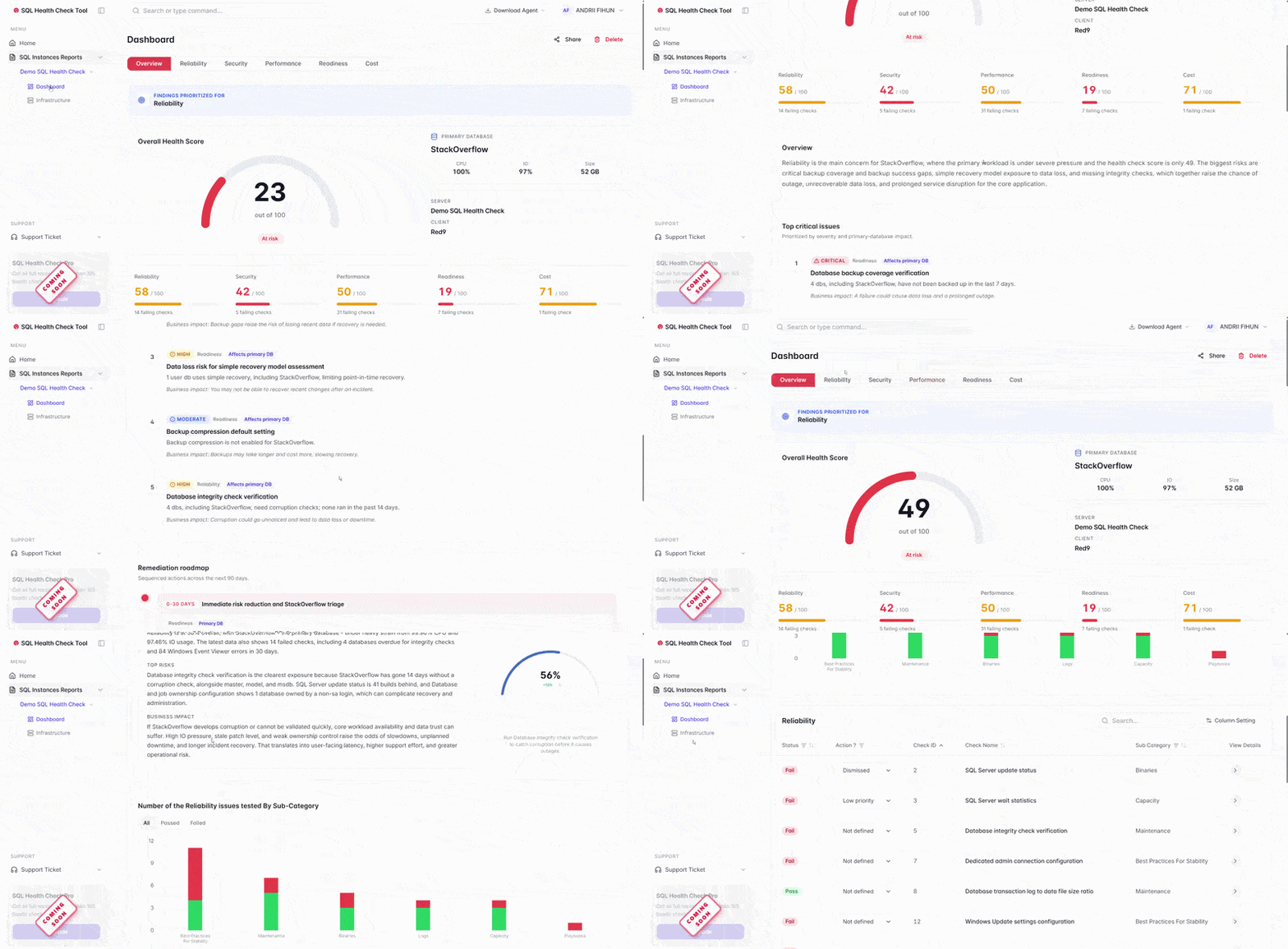
Animated preview of the Red9 SQL Server assessment dashboard — overall score, per-category scores, and findings overview

Get a Prioritized Fix List for Your SQL Server.

  • 110-point review of security, performance, cost, and reliability
  • Prioritized fix list — not a data dump
  • Read-only access. We never touch your data.
  • 30-minute call. Senior DBA, no sales pressure.
Get My Fix List ➜

Trusted by Siemens, Sony, NCR, and 120+ CTOs

Why Red9

Senior SQL Server and Performance Architects, Not a Generalist Agency.

Senior only

You get principal-level SQL Server architects and performance specialists, not juniors learning on your server.

SQL Server is all we do

One platform, gone deep, for over a decade.

We prove it

Every engagement reports before and after numbers you can reconstruct.

24/7/365

15-minute response when production is on fire, for Managed Services and Emergency Services clients.

"You are not in my city, can you still help?"

Yes. Most clients work with us remotely: secure access, your time zone covered, and senior expertise without waiting for someone to drive across town. Prefer in-person? We have a local Alpharetta presence.

How we compare

Red9 vs an In-House DBA vs a Generalist MSP

The honest trade-offs when you have a SQL Server problem in Atlanta.

Category Red9 In-house DBA hire Generalist IT / MSP
Seniority Principal-level senior DBAs only, 15+ yrs average. One person's depth; their day off is your coverage gap. Juniors and generalists; SQL Server is a side skill.
SQL Server focus SQL Server is all we do. Split across many duties. One platform among dozens.
Emergency response 15-minute response, 24/7/365, for Managed and Emergency Services clients. Limited to one person, nights and PTO included. Ticket queue, often hours to days.
Proof Before and after numbers you can reconstruct. Internal, rarely measured. Usually none.
Cost model Scoped project, retainer, or per-incident. No salary or benefits load. $150K+ loaded salary, plus benefits and downtime. Bundled and shallow.
Ramp-up Senior help in days, not months. Months to hire and onboard. Slow, and re-explained on every ticket.
Your team

The Team Behind Your Atlanta Project

Mark Varnas, Red9

Mark Varnas

Founder & CEO

Saulius, Red9

Saulius

Chief Operating Officer

Chloe Pak, Red9

Chloe Pak

Chief Revenue Officer

Find us

Red9 in the Atlanta Metro

We are headquartered in Alpharetta, just north of Atlanta, and serve clients across the metro and the country.

Red9
11720 Amber Park Drive, Suite 160
Alpharetta, GA 30009
Office hoursMon to Fri, 9am to 5pm ET
Always-on supportEmergency support and Managed Services clients: 24 / 7 / 365. Emergency support ➜
Open in Google Maps ➜
Areas we serve

SQL Server Consulting Near Atlanta

We support teams across the metro and throughout Georgia. Explore the areas we serve.

Common questions

SQL Server Consulting in Atlanta: FAQ

Do I need a local SQL Server consultant, or does remote work?

Remote works, and it is how most Atlanta clients use us. Secure remote access plus a 15-minute emergency response means you get senior expertise faster than waiting for an on-site visit. We also have a local Alpharetta presence if you want in-person.

How fast can you respond to a production SQL Server outage?

15 minutes, 24/7/365, from a senior DBA, not a ticket queue. This response-time SLA is available to current Managed Services clients and Emergency Services clients. See Emergency Services ➜

What does SQL Server performance tuning cost?

It starts with a free assessment. Engagements run as a scoped project, a block of senior DBA hours, a monthly managed-services retainer, or per-incident emergency support. Many performance engagements pay for themselves by deferring a hardware or licensing upgrade, and we show you the expected return before you commit.

What versions of SQL Server and cloud platforms do you support?

Every supported SQL Server version, on premises and in the cloud: Azure SQL, SQL Server on Azure VMs, and AWS RDS or EC2. We also handle migrations and upgrades between them.

What is the difference between a SQL Server consultant and a DBA?

A DBA keeps your database running day to day; a SQL Server consultant is a senior specialist you bring in for a specific outcome, such as a migration, a performance problem, an architecture decision, or an emergency. Red9 does both: scoped consulting projects and ongoing managed or remote DBA coverage.

How long does a SQL Server health check take?

The 110-point health check runs in about 5 to 30 minutes against your server, and you get back a prioritized report of what to fix, ranked by impact.

Can you work with our existing in-house IT team?

Yes. Most engagements augment an in-house team: we bring the SQL Server depth they do not have on staff, share findings with before and after numbers, and hand back clear documentation.

Do you work with healthcare or fintech data in Atlanta?

Yes. We work with HIPAA-regulated healthcare systems and high-volume Atlanta fintech and payments databases, with secure access and strict data handling.

Can I find a SQL Server consultant near me in Atlanta?

Yes. Red9 serves Atlanta and the surrounding metro (Alpharetta, Marietta, Sandy Springs, Buckhead) with senior SQL Server consultants. Most work is done through secure remote access, so "near me" really means fast and senior, not a drive across town.

Is my SQL Server ready for AI and ChatGPT workloads?

AI features, RAG pipelines, and assistant integrations like ChatGPT (OpenAI) and Claude (Anthropic) put new load on SQL Server: heavier queries, vector and analytics workloads, and sudden scale. We assess whether your database can handle it and tune it so AI does not take your system down.

Ready to Fix Your SQL Server? Talk to a Senior DBA in Atlanta.

In just 30 minutes, we will show you what is costing you performance, reliability, and money, and what it takes to fix it.

Schedule My Call Now ➜