
TL;DR
Parameter sniffing is SQL Server compiling a stored procedure's plan around the parameter values from its first run, then reusing that plan for every later call.
- It is intended behavior that usually helps by avoiding recompiles, so do not disable it server-wide.
- You have a bad case when the same procedure is sometimes fast and sometimes slow with no other change.
- Confirm it by comparing the plan's compiled parameter value against the runtime value.
- Fixes, lightest first:
OPTIMIZE FOR,OPTION (RECOMPILE), Query Store forced plans, and built-in engine help on newer versions (Parameter Sensitive Plan optimization on SQL Server 2022+, and Optional Parameter Plan Optimization on 2025).
Parameter sniffing is when SQL Server compiles a stored procedure's execution plan based on the parameter values from its first execution, then reuses that plan for every later call. It is usually helpful. This guide explains when it backfires, how to confirm it is the cause, and how to fix it without hobbling the optimizer.
What Parameter Sniffing Is
SQL Server generates a query plan for a stored procedure by "sniffing" the parameters passed the first time it runs.
By "first time" we mean SQL Server is forced to compile the procedure because no plan for it exists in the procedure cache. Every later execution reuses that cached plan, which saves the CPU and memory of compiling a new one (unless something forces a recompile).
The problem starts when that first plan is well suited to its specific parameters but inefficient for other, more commonly used values.
An optimal plan for one set of parameters might use an index scan, while another set would be far better served by an index seek. Parameter sniffing leads to inefficient plans most often when a procedure is called with values that have very different cardinality.
When It Is Good, When It Is Bad
Most of the time it is good. It means SQL Server is caching and reusing plans so your queries run faster, saving the CPU and memory that recompiling would burn.
Parameter sniffing is only bad when your data values are unevenly distributed and the cached plan is not optimal for all of them.
When a stored procedure runs efficiently sometimes and inefficiently other times, and nothing else in the environment is changing, that is often a parameter sniffing case.
How to Tell It Is Parameter Sniffing
Before you reach for a fix, confirm the diagnosis. The tell is a procedure whose performance swings with the parameters, not with load or schema changes. The definitive check is to compare the plan's compiled parameter value against the runtime value. Pull the cached plan and look at the ParameterCompiledValue versus ParameterRuntimeValue in the plan XML: when they differ and the plan is slow, the plan was built for a value unlike the one you are now passing.
On SQL Server 2016 and later, Query Store makes this easier. Its "Regressed Queries" and "Top Resource Consuming Queries" views show the same query alternating between a fast and a slow plan, which is strong evidence of a bad sniff. It is not conclusive on its own (a stats update or different SET options can also flip a plan), so still confirm with the compiled-versus-runtime value.
The DMVs are the other route: run sys.dm_exec_requests during a slow call and use sys.dm_exec_query_stats with sys.dm_exec_query_plan to read the compiled values.
For a fuller DMV toolkit, see our guide to finding slow queries with DMVs.
A Worked Example
Here is parameter sniffing changing performance on a 1-million-row table. We create Customers_Red9 with two nonclustered indexes, IX_Name and IX_Birthdate, filled with random data.
CREATE TABLE dbo.Customers_Red9 (
	CustomerID INT IDENTITY PRIMARY KEY
	,Name VARCHAR(100)
	,Birthdate DATE
	);

CREATE NONCLUSTERED INDEX IX_Name ON dbo.Customers_Red9 (Name);

CREATE NONCLUSTERED INDEX IX_Birthdate ON dbo.Customers_Red9 (Birthdate);
Then a multi-purpose procedure that returns the top 100 rows for a given @Name and @Birthdate (and the top 100 overall if a parameter is not supplied):
CREATE
	OR

ALTER PROCEDURE dbo.usp_GetCustomers @Name VARCHAR(100) = NULL
	,@Birthdate DATE = NULL
AS
SELECT TOP (100) *
FROM dbo.Customers_Red9
WHERE (
		@Name IS NULL
		OR Name = @Name
		)
	AND (
		@Birthdate IS NULL
		OR Birthdate = @Birthdate
		)
ORDER BY CustomerID;
(The optional-parameter OR pattern has plan issues of its own, but it makes the sniffing effect easy to see.) Call it first with @Name = 'Bobbie Dalton' (nothing is in cache yet, so the plan compiles for @Name = 'Bobbie Dalton', @Birthdate = NULL). That call runs in 121 ms.
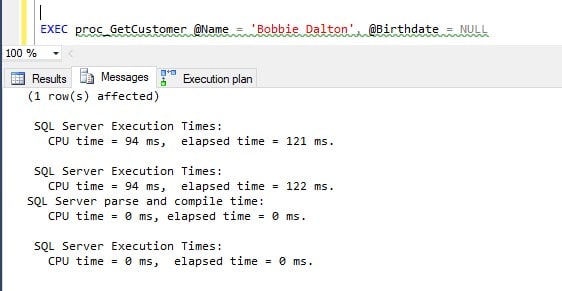
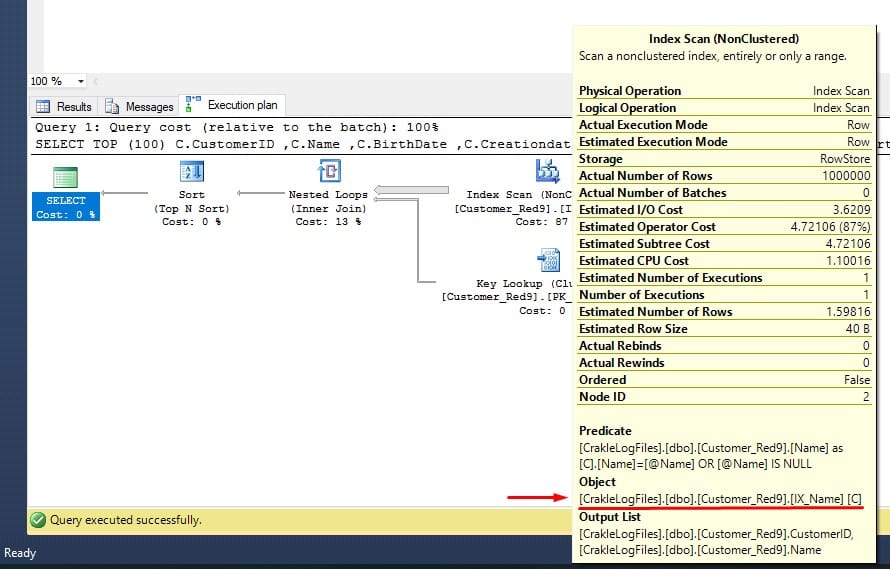
The second call supplies @Name = NULL, @Birthdate = '20060107'. It runs in 1,757 ms, about 14.5x slower. Looking at its plan, SQL Server is using IX_Name (the right index for the first call) instead of IX_Birthdate, because it reused the cached plan whose compiled @Birthdate was NULL. That confirms a bad parameter sniffing problem.
How to Fix Bad Parameter Sniffing
There are many ways to handle it. Start with the lightest-touch option that solves your case rather than disabling sniffing outright.
| Fix | When to use it | Tradeoff |
|---|---|---|
OPTIMIZE FOR (@p = value) | One parameter value dominates real traffic | Hard-codes an assumption; revisit as data shifts |
| OPTIMIZE FOR UNKNOWN | No single value dominates | Ignores the runtime value and estimates from statistics/density; the generic plan can be mediocre for everyone |
| OPTION (RECOMPILE) | Query runs infrequently, or each call truly needs its own plan | Recompiles every run, costs CPU; bad for hot, frequent procs |
| Query Store forced plan | A specific good plan exists and you want to pin it | Manual; the forced plan can age as data changes |
| PSP optimization (2022+) / OPPO (2025) | Skewed data (PSP) or an optional NULL-able predicate (OPPO), and you want it handled automatically | Only kicks in for eligible predicates (see below) |
PARAMETER_SNIFFING = OFF / trace flag 4136 | Last resort, instance or DB-wide pain | Blunt; removes the benefit everywhere, rarely the right call |
For the example above, the OPTION (RECOMPILE) hint forces SQL Server to build a fresh plan on every execution, so each call gets the right index:
SELECT TOP (100) *
FROM dbo.Customers_Red9
WHERE (
		@Name IS NULL
		OR Name = @Name
		)
	AND (
		@Birthdate IS NULL
		OR Birthdate = @Birthdate
		)
OPTION (RECOMPILE);
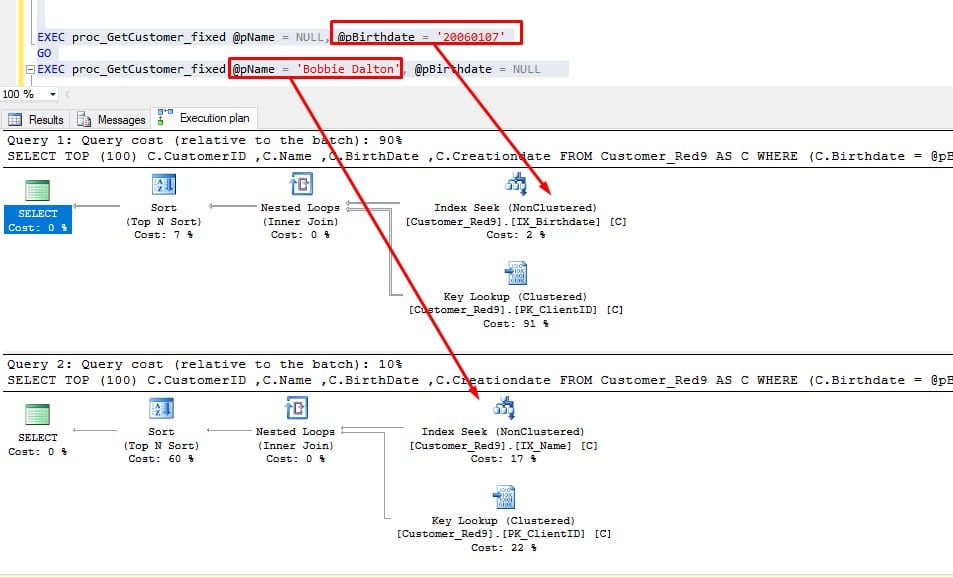
With RECOMPILE, each call now gets its own plan and the right index:
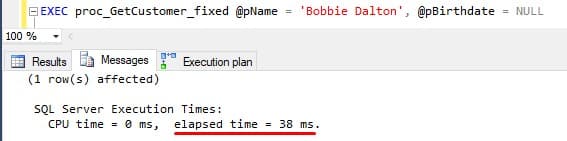
@pName parameter using OPTION (RECOMPILE)The second query, using @pBirthdate:
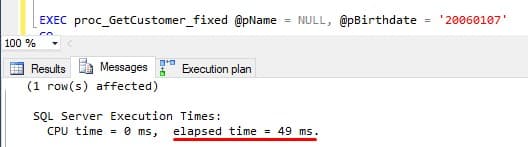
@pBirthdate parameter using OPTION (RECOMPILE)What the RECOMPILE hint does is force the SQL Server to generate a new execution plan every time these queries run.
This way for the two above procedure calls we will get two different execution plans as you can see below:
The catch is you lose plan caching, which can be devastating on a busy system that runs the same procedure constantly. The rule of thumb:
- Complex or frequently-run query? RECOMPILE is the wrong tool. You pay compile CPU on every call.
- Runs rarely (or would fall out of cache anyway)? RECOMPILE is a fine fit.
OPTION (RECOMPILE) also pairs with dynamic SQL. Embedding literal values dodges sniffing but bloats the plan cache with one-off plans, so prefer sp_executesql with parameters. If plan-cache bloat is the real problem, see optimize for ad hoc workloads.
One myth to retire: restarting SQL Server to "clear the problem" only flushes the cache temporarily and hurts everything else. Here is why you should stop restarting SQL Server.
SQL Server 2022 and 2025: PSP Optimization and OPPO
On SQL Server 2022 (16.x) and later, the engine can fight parameter sniffing for you.
Parameter Sensitive Plan (PSP) optimization generates and caches multiple plans for a single parameterized query when a predicate runs against unevenly distributed data, then picks the right one at runtime based on the parameter value.
It is on by default under database compatibility level 160. (Source: Parameter Sensitive Plan optimization, Microsoft Learn.)
PSP does not cover every query: it targets eligible equality predicates on skewed columns and adds some compile cost, so the manual fixes above still matter. You can turn it off two ways:
- Per query: the
DISABLE_PARAMETER_SENSITIVE_PLANhint. - Per database:
ALTER DATABASE SCOPED CONFIGURATION SETPARAMETER_SENSITIVE_PLAN_OPTIMIZATION = OFF.
SQL Server 2022 also enables Query Store by default on new databases at compatibility level 160 (upgraded databases must turn it on manually), which makes forced plans a practical mitigation, as long as you test and monitor, since a forced plan can itself regress as data changes.
SQL Server 2025 (17.x) adds two more tools. The first is Optional Parameter Plan Optimization (OPPO), which targets the exact pattern in the worked example above: an optional predicate where a runtime NULL versus a real value should flip between a scan and a seek. Microsoft describes OPPO as a PSP-adjacent problem handled by the same multi-plan infrastructure. It is on by default at database compatibility level 170 via the OPTIONAL_PARAMETER_OPTIMIZATION scoped configuration. (Source: Optional Parameter Plan Optimization, Microsoft Learn.)
The second is a broader PSP itself. On SQL Server 2025, PSP gains:
- Support for DML statements (
DELETE,INSERT,MERGE,UPDATE). - Expanded
tempdbsupport. - Better handling of multiple eligible predicates on the same table.
PSP still officially covers equality predicates only. (Source: Parameter Sensitive Plan optimization, Microsoft Learn.)
Bottom Line
Parameter sniffing is a feature of SQL Server, not a bug. Most of the time it saves CPU and memory by reusing good plans. When it goes bad, you now know how to confirm it and how to fix it.
Do not reach straight for a workaround. Many quick fixes resolve the symptom for today and leave a worse problem tomorrow. Before adding hints, trace flags, or otherwise hobbling the optimizer, consider every other way to improve the query, and let the newer engine features (PSP on SQL Server 2022+, OPPO on 2025) do the work where they can.
Local variables, dynamic SQL, RECOMPILE, and OPTIMIZE FOR are too often cited as the best solutions when they are actually being misused.
When parameter sniffing hurts often, it usually points to a design or architecture decision rather than an optimizer quirk. If you would rather have senior eyes on a recurring case, that is exactly what our SQL Server performance tuning work is for.
Frequently Asked Questions
Why Is the Same Query Fast in SSMS but Slow in My Application?
SET options, not a different server. SSMS connects with ARITHABORT ON by default while many application drivers do not, so the two use separate cached plans, and your app can be stuck on a bad sniffed plan that SSMS never touches. Compare the SET options on both plans before you blame the query, then treat it as a normal sniffing case.Does Updating Statistics or Rebuilding Indexes Fix Parameter Sniffing?
Does Parameter Sniffing Happen with Entity Framework or Other ORMs?
sp_executesql batches, which SQL Server caches and reuses exactly like a stored procedure, so the same skewed-data problem applies. The ORM itself is rarely the real culprit. Fix it the same way: a query-level OPTION (RECOMPILE) (via an EF command interceptor), a Query Store forced plan, or OPTIMIZE FOR.Is Parameter Sniffing the Same as a Parameter Sensitive Plan?
Will OPTIMIZE FOR UNKNOWN Slow My Query Down?
OPTIMIZE FOR UNKNOWN tells the optimizer to ignore the runtime value and estimate from average column density instead. That gives you one stable plan that never swings wildly, but "average" can be mediocre for every parameter, especially on heavily skewed data. Use it when no single value dominates, and reach for OPTION (RECOMPILE) when each call genuinely needs its own plan.Do Newer SQL Server Versions Fix Parameter Sniffing Automatically?
NULL-able optional predicates and extends PSP to DML. Neither covers every query, so the manual fixes still matter.
