

Backing up your SQL Server Database is essential for protecting your data.
When databases become bigger, you’re going to run out of time to do a full backup every day.
That’s why many companies have differential backups running over the night (daily) and full backups on weekends.
What are differential backups?
The differential backup is based on the latest full backup of a complete or partial database or a set of data files or filegroups.
It captures the pages that have changed, not just the sum of the total of the transaction logs that have happened since the last full backup.
When the disaster comes, to do a restore, you need:
- The most recent full backup
- The most recent differential backup
- The transaction logs since the differential
Common issues with Differential backups
Lacking full backup
Do you have the last full backup file safe? Is it accessible and working correctly?
The differential backup is useless without the full backup.
If your maintenance plan was not set up properly, it might delete your full backups and keep only the recent differentials.
For example, maintenance plans like Ola Hallengren have a feature that automatically deletes backups older than X days.
Breaking the backup chain
It is not unusual to find backups being run by some mysterious third-party tools in an enterprise environment.
This might seem like a straightforward task, but if a tool or someone else performs a full backup on the production server to refresh the development server, it's crucial to know the exact location of that file.
The next differential backup would refer to the most recent full backup – even if you were not the one who did it.
Not too long ago, we faced a situation where a client encountered an error while trying to restore the differential backup. The message from SQL Server was, “The log backup chain is broken,” indicating an error when the log backup process fails in SQL Server.
In an in-depth investigation, we figured out that a tool from the VM machine was running every day and breaking the backup chain:

As you can see above, the last differential (DIFF_20200922_000501.bak – 09/22/2020) relies on a full backup made on 09/21/2020 at 5:00 PM. So, in this case, the full backup “FULL_20200920_000502.bak” can not be used for restoring. Once another FULL was taken, this broke the backup chain.
That is why having two backup strategies can be a recipe for disaster. Unfortunately, the last full backup needed to restore the last differential backup file was inaccessible to the client.
The good news is that transaction log backups are NOT susceptible to this problem. Only differential backups are.
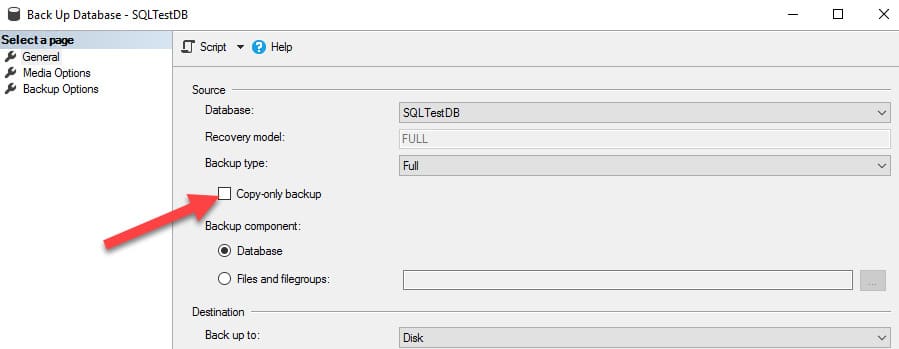
If you need an extra “Adhoc” backup of a live database, check out copy-only backups that don’t affect the Backup Chain.
In short, you can specify a copy-only full backup using T-SQL syntax:
BACKUP DATABASE MyDatabase TO DISK 'E:\Backup\CopyOnly_MyDatabase.bak'
WITH COPY_ONLY;
Another option is to use the GUI version in SSMS, just checking the Copy-only backup checkbox in the Backup window.
Rebuilding indexes after the full backup
Do you have a maintenance plan that rebuilds the indexes every day on your server? Take care.
If you are rebuilding all indexes on all tables, expect your differential backups to be about the same size as your full backups.
When taking a full backup and then rebuilding the indexes afterward, all the changes involved in rebuilding the indexes will be reflected in differential backups in the future.
To prevent the differential backups from being excessively large, schedule the index maintenance right before the full backup.
The differential backups can save your maintenance window when done right.
But if you are not prepared for the additional management discipline they require, they are worse than no backups at all.
Check the best practices to keep your SQL Server backups safe and avoid mistakes.

