


TL;DR
The vendor said buy more hardware. A four-line script that swapped the primary key default from NEWID to NEWSEQUENTIALID made the system 6.5x faster instead.
- Random GUIDs from
NEWIDmade SQL Server sort data on every insert, a sort that ate 50% of the query cost. - The four-line ALTER ran in under five minutes and dropped the stored procedure from 5,268 ms to 842 ms, with CPU time down 83%.
- That avoided a $50K+ hardware upgrade. Before you scale up, read the execution plan for sorts that should not be there.
Your application vendor says the performance is "normal for the workload."
Translation: They have no idea how to fix it.
We see this constantly. A company is paying thousands per month for SQL Server licenses and hardware, their application is slow, and the vendor's solution is always the same: add more resources.
But here's what most vendors won't tell you: the problem is often in how they designed the database.
We recently worked with a mid-sized logistics company running a warehouse management system. Their batch processing was painfully slow. Every time they tried to log incidents or process receiver batches, the application would crawl.
The vendor kept pushing for hardware upgrades. More CPU cores. More memory. Maybe move to a bigger Azure VM. We ran our 145-point health check and found the real problem in under two hours.
The Hidden Cost of Random GUIDs
The bottleneck was in a stored procedure called uspReceiverLogInsertBatch. Every time it ran, it inserted records into the tblReceiverLog table, which triggered another insert into the tblIncident table.
Nothing unusual there. Standard database operations.
But when we looked at the execution plan, we saw something that shouldn't have been there: a sort operation consuming 50% of the query cost.
Why was SQL Server sorting data on every insert?
The answer was in the primary key definition:
IncidentID uniqueidentifier ROWGUIDCOL NOT NULL
    CONSTRAINT DF_YourTable_IncidentID DEFAULT NEWID()
The NEWID() function generates random GUIDs. Every single one is completely random, with no sequential pattern.
With random GUIDs as the clustered key, SQL Server cannot rely on insert locality, which forces frequent page navigation and increases the likelihood of page splits and latch contention.
So SQL Server sorts the incoming data before inserting it into the clustered index. Every. Single. Time.
This creates three problems:
- Extra CPU overhead - Sorting requires computational resources
- Increased memory pressure - Sort operations need a memory workspace
- Page splits - Random insertions fragment your clustered index
The company was paying for all of this with slower application performance and higher infrastructure costs.
The Fix: Four Lines of SQL
The solution was straightforward: switch from NEWID() to NEWSEQUENTIALID().
NEWSEQUENTIALID() generates GUIDs in a sequential pattern per SQL Server instance, significantly improving insert locality.
This allows SQL Server to insert new rows at the end of the clustered index in the vast majority of cases, avoiding the random insert behaviour caused by NEWID().
This removes the need for random insert positioning and significantly reduces internal index maintenance work during inserts.
Here's the complete change script (This change was executed during a controlled maintenance window due to the required clustered index rebuild):
ALTER TABLE [dbo].[tblIncident]
DROP CONSTRAINT [PK_tblIncident]
WITH (ONLINE = OFF);
GO

ALTER TABLE dbo.tblIncident
DROP CONSTRAINT [DF_tblIncident_IncidentID];

ALTER TABLE dbo.tblIncident
ADD CONSTRAINT DF_tblIncident_IncidentID
DEFAULT NEWSEQUENTIALID() FOR IncidentID;

ALTER TABLE [dbo].[tblIncident]
ADD CONSTRAINT [PK_tblIncident]
PRIMARY KEY CLUSTERED ([IncidentID] ASC);
Four statements. Less than five minutes to execute.
The Results
We tested the stored procedure before and after the change. The improvements were dramatic:
Duration
- Before: 5,268 milliseconds
- After: 842 milliseconds
- Improvement: 84% faster
CPU Time
- Before: 5,285 milliseconds
- After: 870 milliseconds
- Improvement: 83% reduction
Table Scans
- Before: 55 scans
- After: 25 scans
- Improvement: 55% fewer scans
Overall Performance: 6.5x faster
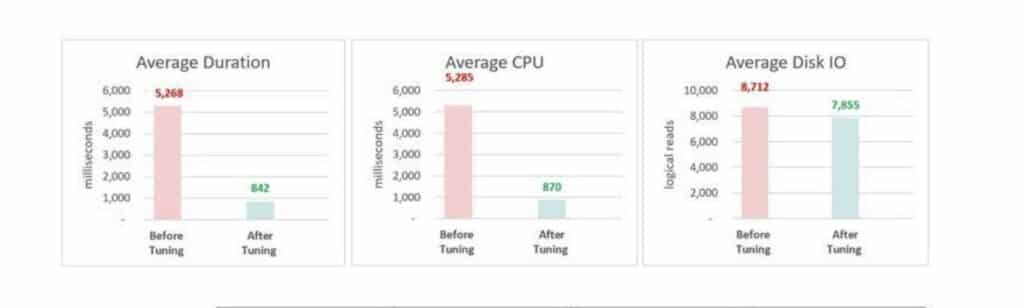
The sort operation disappeared completely from the execution plan. The database stopped doing unnecessary work on every transaction.
User complaints about slow batch processing stopped immediately.
Why This Matters for Your Business
This warehouse management company wasn't on some ancient SQL Server version. They weren't running on inadequate hardware. The vendor's software was simply using an inefficient design pattern.
And they're not alone.
Most commercial application vendors default to random GUIDs because they're "easy" and guarantee uniqueness across distributed systems. The vendors never think about what happens when you're processing millions of transactions per month.
You end up paying for their lazy defaults in three ways:
- Higher infrastructure costs - More CPU, more memory, bigger servers
- Slower user experience - Applications that feel sluggish under normal workload
- Wasted DBA time - Your team constantly troubleshooting "slow database" issues
The real kicker? We told this company they could get another 20-50x improvement by replacing GUIDs entirely with an INT SEQUENCE.
INT values are faster to compare, use significantly less storage than GUIDs, and minimize fragmentation when inserted sequentially. SQL Server’s storage engine is most efficient when clustered keys are narrow, immutable, sequential and criteria naturally met by integer-based keys.
But that change requires the vendor to modify their application code. And vendors move slowly on performance improvements that don't affect their entire customer base.
What You Can Do Right Now
If you're running vendor-supplied software and experiencing performance issues, don't assume you need more hardware.
Start by examining execution plans for your slowest queries. Look for:
- Unexpected sort operations
- High-cost operators that shouldn't be there
- Key lookups on every query
- Missing index recommendations that the vendor never implemented
Most application vendors build for functionality, not performance. They test with small datasets and assume you'll scale vertically when you hit performance problems.
But scaling vertically gets expensive fast. A proper database design costs nothing and often delivers far better results than throwing hardware at the problem.
Beyond NEWSEQUENTIALID
The NEWSEQUENTIALID fix was the low-hanging fruit. But there's a bigger lesson here about vendor database design.
This same company had other issues we found:
- Missing indexes on frequently joined columns
- Stored procedures with parameter sniffing problems
- Transaction log growth because nobody configured it properly
- Statistics that hadn't been updated in months
Each of these issues compounded the GUID problem. The database was working harder than it needed to on every operation.
When we optimize a client's SQL Server environment, we're not just fixing one bottleneck.
We're looking at the entire system:
- How the vendor designed their schema
- Which queries run most frequently
- Where the database spends CPU time
- What's causing memory pressure
- Whether your hardware is actually the right size for your workload
Sometimes the answer is "yes, you need more resources." But nine times out of ten, the answer is "your vendor's database design is costing you money."
The Real Problem with Vendor Software
Application vendors face an impossible situation.
They need to build software that works for hundreds or thousands of clients. Each client has different data volumes, different usage patterns, and different infrastructure. The shape of that data varies as much as the size, and around 80% of the world's data is unstructured, per our big data statistics.
So vendors optimize for the lowest common denominator: small databases, simple queries, default configurations.
They assume you'll tune the database later if you need to.
Except most companies don't have the SQL Server expertise in-house to know what to tune. So they suffer with poor performance, or they throw money at bigger servers, or they accept that "this is just how the application runs."
Meanwhile, simple changes like switching from NEWID to NEWSEQUENTIALID could save tens of thousands of dollars per year in infrastructure costs and improve user experience dramatically.
What We Learned
This warehouse management case study reinforced three things we see constantly:
- Vendor software often has hidden performance issues - Not because vendors are incompetent, but because they optimize for compatibility, not performance
- Small database changes create huge business impact - A four-line SQL script delivered far better performance than any hardware upgrade would have
- Most companies don't know what's possible - The client thought slow batch processing was normal until we showed them the execution plan
The execution plan doesn't lie. It shows you exactly what SQL Server is doing and where it's spending time.
If your vendor says "performance is normal," ask them to show you the execution plans for your slowest operations.
If they can't or won't, that tells you everything you need to know about how seriously they take database performance.
Frequently Asked Questions
Why do vendors use NEWID() instead of NEWSEQUENTIALID()?
NEWID() is simpler to implement and works across distributed systems without coordination. NEWSEQUENTIALID() requires SQL Server 2005 or newer and only guarantees uniqueness within a single SQL Server instance. Most vendors choose NEWID() because it's the safer default, even though it performs worse.Can I change NEWID() to NEWSEQUENTIALID() without vendor support?
What’s the difference between NEWSEQUENTIALID() and an INT IDENTITY column?
NEWSEQUENTIALID() still generates 16-byte GUIDs, just in sequential order. An INT IDENTITY uses 4 bytes and is much faster for SQL Server to work with. GUIDs are globally unique across systems, while INT values are only unique within a table. If your application truly needs globally unique identifiers, NEWSEQUENTIALID() is the compromise. If not, INT IDENTITY is almost always the better choice.Will NEWSEQUENTIALID() cause page splits?
NEWID() does. NEWSEQUENTIALID() inserts at the end of the clustered index, which is the most efficient insertion point. You'll still get page splits when pages fill up, but these are predictable and manageable with proper fill factor settings.How do I know if my application is using NEWID()?
NEWID(): SELECT OBJECT_NAME(parent_object_id) AS TableName, name AS ConstraintName, definition FROM sys.default_constraints WHERE definition LIKE '%newid()%'Then check execution plans for any stored procedures that insert into these tables. Look for sort operators you can't explain.
What other common vendor database design issues should I look for?
- GUIDs as primary keys (we just covered this)
- Missing indexes on foreign key columns
- Non-indexed predicates in WHERE clauses
SELECT *queries pulling unnecessary columns- Improper transaction isolation levels
- Statistics never updated
- No index maintenance plan
How much performance improvement should I expect from fixing GUID issues?
Can I use NEWSEQUENTIALID() in SQL Server 2019 and higher?
NEWSEQUENTIALID() has been available since SQL Server 2005. Any modern SQL Server version supports it.What if my vendor won’t make this change?
Conclusion
Your application vendor's database design choices directly impact your infrastructure costs and user experience.
Random GUIDs are just one example of how vendor software optimization decisions create hidden costs for their customers.
The warehouse management company in this case study went from slow, frustrating batch processing to near-instant performance. They avoided a costly hardware upgrade. And their users stopped complaining about the application being "slow."
All from changing one default constraint.
If your vendor-supplied application feels slow, start with the execution plans. The database will tell you exactly what's wrong, even if the vendor won't.

